🔀 Control Statements in Java: if, if-else and Nested if
📌 Introduction
Control statements in Java are used to control the flow of execution of a program. By default, Java executes statements sequentially, but real-world programs require decision-making based on conditions.
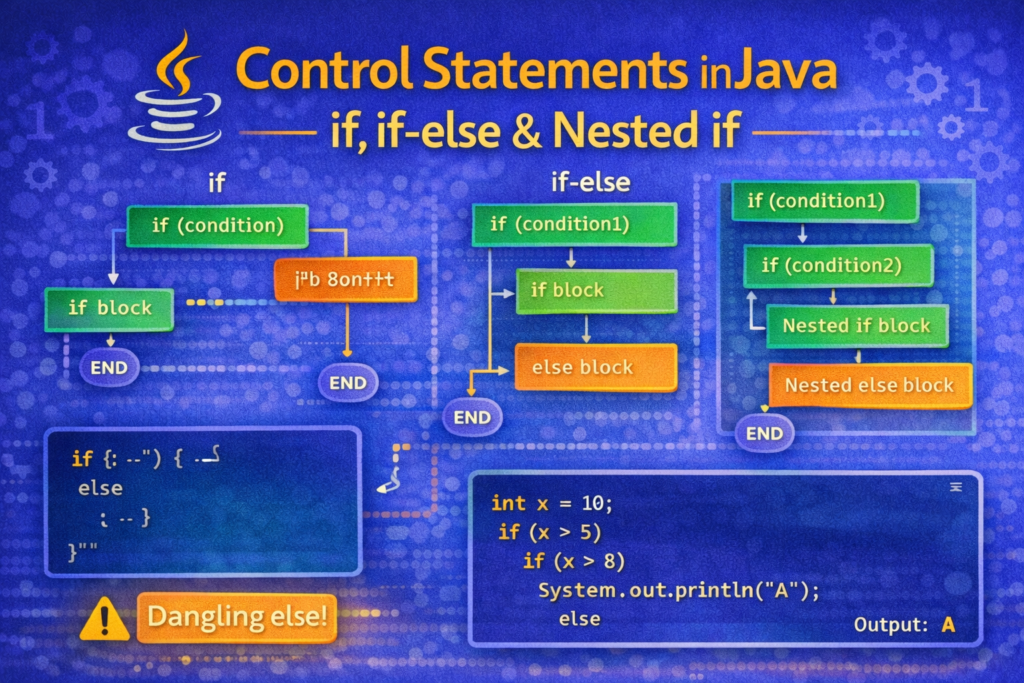
The if, if-else, and nested if statements allow a program to choose different execution paths depending on whether a condition is true or false.
🧠 What Are Control Statements?
📌 Definition
Control statements are statements that alter the normal flow of execution based on conditions or decisions.
Java control statements are broadly classified into:
- Decision-making statements
- Looping statements
- Branching statements
👉 In this article, we focus on decision-making statements.
✅ The if Statement in Java
🔹 Syntax of if Statement
if (condition) {
    // statements to execute if condition is true
}
🔹 How if Works
- The condition must be of boolean type
- If the condition is
true, the block executes - If
false, the block is skipped
🧪 Example: Simple if
int age = 20;

if (age >= 18) {
    System.out.println("Eligible to vote");
}
✔ Output:
Eligible to vote
⚠️ Important Rule
The condition inside if must be boolean.
❌ Invalid:
if (age) // compilation error
✔ Correct:
if (age > 0)
❌ Common Mistakes with if
❌ Mistake 1: Using Assignment Instead of Comparison
if (x = 5) // ERROR
🧠 = is assignment, not comparison.
✔ Correct:
if (x == 5)
❌ Mistake 2: Semicolon After if
if (x > 0); {
    System.out.println("Positive");
}
⚠️ This block executes always, regardless of condition.
🔁 The if-else Statement in Java
🔹 Syntax of if-else
if (condition) {
    // executes if condition is true
} else {
    // executes if condition is false
}
🧪 Example: if-else
int number = 7;

if (number % 2 == 0) {
    System.out.println("Even number");
} else {
    System.out.println("Odd number");
}
✔ Output:
Odd number
🧠 Flow Explanation
- Condition checked
- One and only one block executes
- Either
iforelse, never both
⚠️ Tricky Example: Braces Matter
int x = 10;

if (x > 5)
    System.out.println("Greater than 5");
    System.out.println("End");
✔ Output:
Greater than 5
End
🧠 Only the first statement belongs to if.
✔ Best practice:
if (x > 5) {
    System.out.println("Greater than 5");
}
🔂 Nested if Statement in Java
🔹 What Is Nested if?
An if inside another if is called a nested if.
It is used when decisions depend on multiple conditions.
🔹 Syntax
if (condition1) {
    if (condition2) {
        // statements
    }
}
🧪 Example: Nested if
int marks = 85;

if (marks >= 35) {
    if (marks >= 75) {
        System.out.println("Distinction");
    }
}
✔ Output:
Distinction
🧠 Explanation
- First condition checks pass/fail
- Second condition checks grade
- Inner
ifexecutes only if outerifis true
⚠️ The “Dangling else” Problem (VERY IMPORTANT)
🔥 Confusing Code
int x = 10;

if (x > 5)
    if (x > 8)
        System.out.println("A");
    else
        System.out.println("B");
✔ Output:
A
🧠 else is associated with the nearest if, not the first one.
✔ Correct Version (Using Braces)
if (x > 5) {
    if (x > 8) {
        System.out.println("A");
    } else {
        System.out.println("B");
    }
}
⚠️ Common Compilation Errors
❌ Using Non-Boolean Conditions
if (5) // ERROR
❌ Missing Parentheses
if x > 5 // ERROR
✔ Correct:
if (x > 5)
❌ Missing Braces in Nested Logic
Leads to logical errors, not compilation errors.
🧠 Best Practices for Control Statements
✔ Always Use Braces
Even for single statements.
✔ Keep Conditions Simple
Complex conditions reduce readability.
✔ Avoid Deep Nesting
Too many nested if statements make code hard to maintain.
📘 Real-World Examples
- Login validation
- Exam grading systems
- Eligibility checks
- Decision-based workflows
Example:
if (username.equals("admin")) {
    if (password.equals("1234")) {
        System.out.println("Login successful");
    }
}
📌 Quick Summary
if→ executes block when condition is trueif-else→ chooses between two paths- Nested
if→ handles multiple dependent conditions - Conditions must be boolean
- Braces prevent logical errors
🏁 Conclusion
Control statements form the foundation of decision-making in Java programs. Mastering if, if-else, and nested if helps in writing logical, readable, and error-free programs. Understanding common mistakes and tricky cases ensures better debugging skills and confidence in problem-solving.