📝 Assignment Operators in Java
📌 Introduction
Assignment operators in Java are used to assign values to variables. While the basic assignment operator (=) appears simple, Java also provides compound assignment operators that combine arithmetic operations with assignment.
These operators are frequently used in:
- Calculations
- Loops
- Updating variable values
- Performance-optimized code
A clear understanding of assignment operators is essential before moving on to control statements and loops.
🧠 What Are Assignment Operators?
📘 Definition
Assignment operators assign the result of an expression to a variable.
The general syntax is:
variable = expression;
📊 Types of Assignment Operators in Java
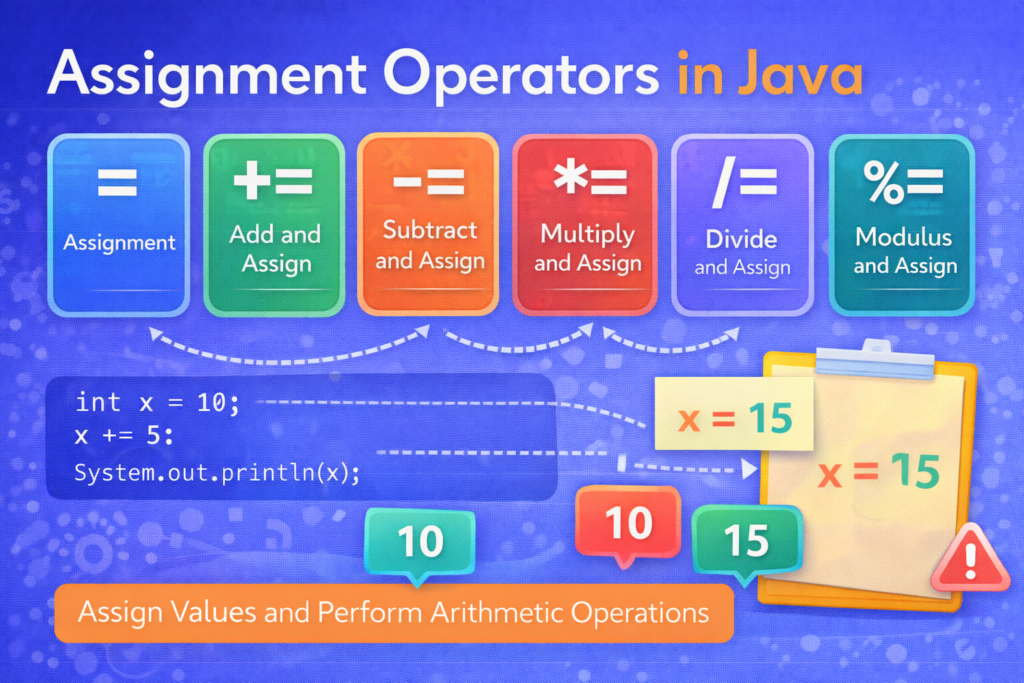
Java supports the following assignment operators:
- Simple assignment (
=) - Compound assignment:
+=-=*=/=%=
🟰 1. Simple Assignment Operator (=)
📌 Basic Usage
The = operator assigns the value on the right-hand side to the variable on the left-hand side.
int x = 10;
System.out.println(x);
✔ Output:
10
⚠️ Common Confusion: = vs ==
if (x = 5) {   // ERROR
    System.out.println("Hello");
}
❌ Compilation Error
🧠 Explanation:
=assigns value==compares values- Assignment cannot be used as a condition in Java
✔ Correct:
if (x == 5) {
    System.out.println("Hello");
}
⚠️ Tricky Example
int a = b = c = 10;
✔ Valid Java code
🧠 Explanation:
- Assignment is right-to-left
cgets 10 →bgetsc→agetsb
➕ 2. Addition Assignment Operator (+=)
📌 Meaning
Adds a value to a variable and assigns the result back.
int x = 10;
x += 5;
System.out.println(x);
✔ Output:
15
🧠 Equivalent Expression
x = x + 5;
⚠️ Tricky Example with Data Types
byte b = 10;
b += 5;
System.out.println(b);
✔ Output:
15
🧠 Why no error?
b += 5performs implicit casting
But:
byte b = 10;
b = b + 5;   // ERROR
❌ Compilation Error
🧠 Because b + 5 becomes int
➖ 3. Subtraction Assignment Operator (-=)
📌 Meaning
Subtracts a value and assigns the result.
int x = 20;
x -= 8;
System.out.println(x);
✔ Output:
12
⚠️ Tricky Case
int x = 5;
x -= x;
System.out.println(x);
✔ Output:
0
✖️ 4. Multiplication Assignment Operator (*=)
📌 Meaning
Multiplies the variable by a value and assigns the result.
int x = 4;
x *= 3;
System.out.println(x);
✔ Output:
12
⚠️ Overflow Confusion
int x = 100000;
x *= 100000;
System.out.println(x);
✔ Output:
1410065408
🧠 Explanation:
- Integer overflow occurs
- No compile-time error
- Result wraps around
➗ 5. Division Assignment Operator (/=)
📌 Meaning
Divides the variable and assigns the result.
int x = 10;
x /= 4;
System.out.println(x);
✔ Output:
2
🧠 Integer division truncates decimals.
⚠️ Tricky Example
double x = 10;
x /= 4;
System.out.println(x);
✔ Output:
2.5
🧠 Result depends on data type of the variable, not the literal.
➗ 6. Modulus Assignment Operator (%=)
📌 Meaning
Finds remainder and assigns it back.
int x = 10;
x %= 3;
System.out.println(x);
✔ Output:
1
🧠 Common Usage
- Checking even or odd
- Cyclic counters
- Digit extraction
⚠️ Important Confusions & Tricky Cases
❌ 1. Assignment Inside Expression
int x = 5;
int y = x += 3;
System.out.println(x + " " + y);
✔ Output:
8 8
🧠 x += 3 returns the assigned value.
❌ 2. Order of Evaluation
int x = 5;
x += x *= 2;
System.out.println(x);
✔ Output:
15
🧠 Explanation:
x *= 2→x = 10x += 10→x = 15
❌ 3. Using Assignment in Conditions (NOT allowed)
if (x += 5) {   // ERROR
}
❌ Java does not allow assignment expressions to act as conditions.
❌ 4. Confusion with Precedence
Assignment operators have lower precedence than arithmetic operators.
int x = 10;
x += 5 * 2;
System.out.println(x);
✔ Output:
20
🧠 Evaluated as:
x = x + (5 * 2)
📊 Summary of Assignment Operators
=assigns value+=adds and assigns-=subtracts and assigns*=multiplies and assigns/=divides and assigns%=assigns remainder
🎯 Why Assignment Operators Are Important
⭐ Key Reasons
- Reduce code length
- Improve readability
- Used heavily in loops
- Improve performance
- Common in exams and interviews
🏁 Conclusion
📝 Final Summary
Assignment operators in Java do much more than simply assigning values. Compound assignment operators combine arithmetic operations with assignment, making code concise and efficient. However, misunderstanding implicit casting, operator precedence, and evaluation order can lead to subtle bugs.
A solid understanding of assignment operators prepares learners for:
- Looping statements
- Control structures
- Expression evaluation