🧠 JVM Architecture in Detail
📌 Introduction
The Java Virtual Machine (JVM) is the core component that enables Java’s platform independence, security, and performance. Every Java program runs inside a JVM, making it essential to understand how the JVM works internally.
This article explains the complete JVM architecture, its components, memory areas, execution engine, and how they work together to execute Java programs efficiently.
☕ What Is the Java Virtual Machine (JVM)?
🧠 Definition
The Java Virtual Machine (JVM) is an abstract machine that:
- Executes Java bytecode
- Converts bytecode into machine-specific instructions
- Provides memory management and security
- Enables platform independence
Each operating system has its own JVM implementation, but all JVMs follow the same specification.
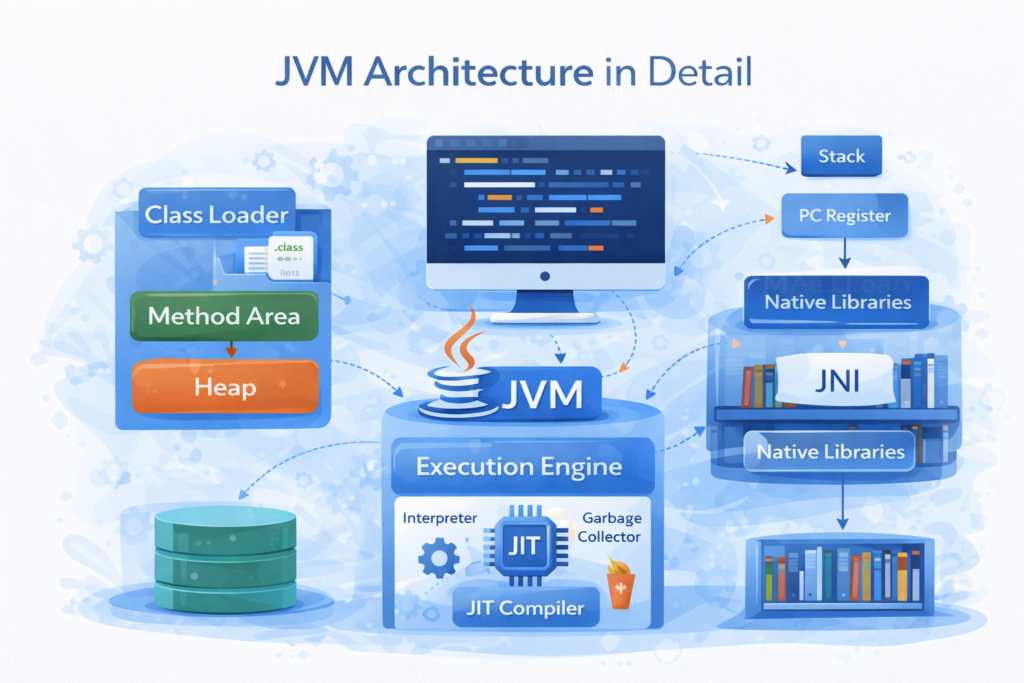
🧩 High-Level JVM Architecture Overview
🏗️ Major Components of JVM
The JVM architecture consists of the following major components:
- Class Loader Subsystem
- Runtime Data Areas
- Execution Engine
- Native Method Interface (JNI)
- Native Method Libraries
All these components work together to execute a Java program.
📦 Class Loader Subsystem
📌 Purpose of Class Loader
The Class Loader Subsystem is responsible for:
- Loading
.classfiles into memory - Ensuring classes are loaded only once
- Maintaining security
Classes are loaded on demand, not all at once.
🔄 Phases of Class Loading
1️⃣ Loading
- Reads
.classfile - Generates binary data
- Creates a Class object in memory
2️⃣ Linking
Linking has three steps:
a) Verification
- Ensures bytecode is valid
- Prevents illegal operations
- Ensures security
b) Preparation
- Allocates memory for static variables
- Assigns default values
c) Resolution
- Replaces symbolic references with direct references
3️⃣ Initialization
- Static variables are assigned actual values
- Static blocks are executed
🧱 Types of Class Loaders
| Class Loader | Description |
|---|---|
| Bootstrap | Loads core Java classes |
| Extension | Loads extension libraries |
| Application | Loads application-level classes |
🧠 Runtime Data Areas (Memory Areas)
📌 Overview
Runtime Data Areas are memory regions used by JVM during execution.
Some areas are shared, others are thread-specific.
🧱 Method Area
📌 Purpose
The Method Area stores:
- Class metadata
- Method information
- Static variables
- Runtime constant pool
This area is shared among all threads.
🧱 Heap Area
📌 Purpose
The Heap is used to store:
- Objects
- Instance variables
It is:
- Shared among all threads
- Managed by Garbage Collector
🗑️ Heap Structure
Heap is divided into:
- Young Generation
- Old Generation
Objects move between these based on lifespan.
🧱 Stack Area
📌 Purpose
Each thread has its own Stack.
Stack stores:
- Method calls
- Local variables
- Operand stack
- Return values
📌 Stack Frame
Every method call creates a stack frame, which is removed after method execution.
🧱 PC Register
📌 Purpose
The Program Counter (PC) Register:
- Holds the address of the current instruction
- Is thread-specific
Each thread has its own PC register.
🧱 Native Method Stack
📌 Purpose
Used for:
- Native methods written in C/C++
- Low-level system operations
⚙️ Execution Engine
📌 Role of Execution Engine
The Execution Engine executes bytecode loaded into memory.
It consists of:
- Interpreter
- Just-In-Time (JIT) Compiler
- Garbage Collector
▶️ Interpreter
- Executes bytecode line by line
- Simple but slower
⚡ Just-In-Time (JIT) Compiler
- Converts frequently executed bytecode into native code
- Improves performance significantly
🗑️ Garbage Collector
- Automatically removes unused objects
- Frees heap memory
- Prevents memory leaks
Java developers do not manually deallocate memory.
🔗 Java Native Interface (JNI)
📌 What Is JNI?
The Java Native Interface (JNI) allows Java programs to:
- Interact with native code
- Access system-level resources
JNI bridges Java and non-Java code.
📚 Native Method Libraries
📌 Purpose
These are:
- Platform-specific libraries
- Written in C or C++
- Loaded via JNI
🔄 Complete JVM Execution Flow
🧩 Step-by-Step Flow
.javafile is compiled to.classfile- Class Loader loads the class
- Bytecode verification occurs
- Runtime data areas are allocated
- Execution Engine executes bytecode
- Garbage Collector manages memory
📊 JVM Architecture Summary Table
| Component | Responsibility |
|---|---|
| Class Loader | Loads classes |
| Method Area | Stores class data |
| Heap | Stores objects |
| Stack | Stores method calls |
| PC Register | Tracks execution |
| Execution Engine | Executes bytecode |
| Garbage Collector | Manages memory |
| JNI | Native interaction |
❌ Common Misconceptions About JVM
🚫 JVM Is Platform Independent
❌ Incorrect
✔ JVM is platform dependent
✔ Bytecode is platform independent
🚫 JVM Is Only an Interpreter
❌ Incorrect
✔ JVM uses interpreter + JIT compiler
🚫 Memory Must Be Managed Manually
❌ Incorrect
✔ JVM handles memory automatically
🧠 Simple Analogy
📘 Real-World Analogy
- JVM → Factory
- Bytecode → Raw material
- Execution Engine → Machines
- Garbage Collector → Waste management
Everything works together to produce output efficiently.
🏁 Conclusion
📝 Final Summary
The JVM architecture is the backbone of Java’s performance, security, and portability. By combining class loading, structured memory areas, an optimized execution engine, and automatic memory management, the JVM enables Java programs to run efficiently on any platform.
A deep understanding of JVM architecture helps learners:
- Debug issues effectively
- Optimize performance
- Understand advanced Java concepts
This knowledge is essential for mastering Java.