💬 Comments in Java: Single-Line, Multi-Line and Documentation Comments
📌 Introduction
Comments in Java are non-executable statements used to explain code. They are ignored by the Java compiler and do not affect program execution. Comments play a crucial role in improving code readability, maintainability, debugging, and documentation, especially in large projects and team environments.
A well-commented program is easier to understand, review, and modify.
🧠 Why Are Comments Important in Java?
📌 Purpose of Using Comments
Comments are used to:
- Explain complex logic
- Improve readability for beginners
- Help other developers understand the code
- Document classes, methods, and variables
- Temporarily disable code during debugging
👉 In real-world software development, comments are considered a best practice, not an optional feature.
📝 Types of Comments in Java
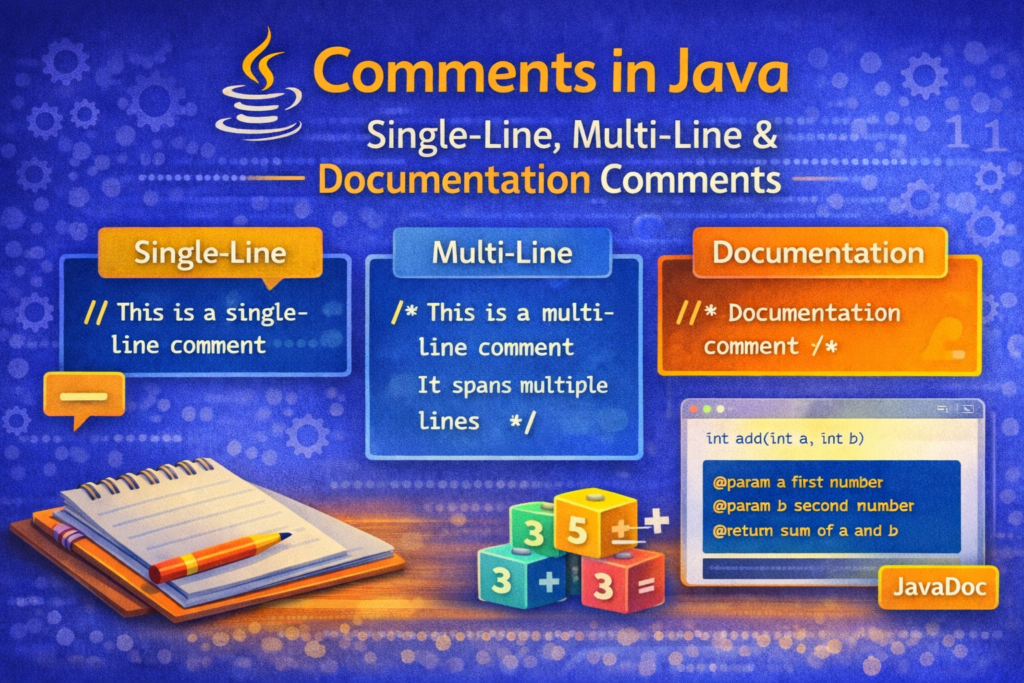
Java supports three types of comments:
- Single-line comments
- Multi-line comments
- Documentation comments
Each serves a different purpose.
✏️ Single-Line Comments in Java
📌 Definition
A single-line comment starts with // and continues till the end of the line.
📘 Syntax
// This is a single-line comment
🧪 Example
int a = 10;   // Variable declaration
System.out.println(a);  // Printing value of a
🧠 Explanation
- Everything after
//is ignored by the compiler - Useful for short explanations or inline comments
✅ Common Use Cases
- Explaining one line of code
- Adding quick notes
- Commenting out a single line during debugging
🧾 Multi-Line Comments in Java
📌 Definition
Multi-line comments start with /* and end with */. They can span across multiple lines.
📘 Syntax
/*
This is a multi-line comment
It can span multiple lines
*/
🧪 Example
/*
This program demonstrates
the use of multi-line comments
*/
int x = 5;
int y = 10;
System.out.println(x + y);
🧠 Explanation
- Entire block is ignored by the compiler
- Useful for describing logic, algorithms, or program flow
⚠️ Important Note
Java does not support nested comments.
❌ Invalid:
/*
   This is a comment
   /* Nested comment */
*/
📚 Documentation Comments (JavaDoc)
📌 Definition
Documentation comments are special comments used to generate official documentation using the javadoc tool.
They start with /** and end with */.
📘 Syntax
/**
 * Documentation comment
 */
🧪 Example: Class Documentation
/**
 * This class demonstrates the use of comments in Java.
 * It is a simple example for beginners.
 */
public class CommentsDemo {
    public static void main(String[] args) {
        System.out.println("Comments in Java");
    }
}
🧪 Example: Method Documentation
/**
 * Adds two integers and returns the result.
 *
 * @param a first number
 * @param b second number
 * @return sum of a and b
 */
public static int add(int a, int b) {
    return a + b;
}
🏷️ Common JavaDoc Tags (IMPORTANT FOR EXAMS)
📌 Frequently Used Tags
@param– describes method parameters@return– explains return value@author– author of the class@version– version information@since– version since available
⚙️ Generating Documentation Using JavaDoc
📌 Command
javadoc ClassName.java
📌 Output
- Generates HTML files
- Used in professional projects
- Official Java API documentation is generated using JavaDoc
⚠️ Common Mistakes Students Make
❌ Mistake 1: Over-commenting Simple Code
int x = 5; // assign 5 to x
🧠 Obvious code does not need explanation.
❌ Mistake 2: Commenting Instead of Writing Clean Code
int a; // this variable stores number of students
Better:
int studentCount;
❌ Mistake 3: Forgetting to Update Comments
Outdated comments can be more dangerous than no comments.
❌ Mistake 4: Using Comments to Hide Errors
// int x = a + b;
✔ Useful temporarily
❌ Bad practice if left in final code
✅ Best Practices for Writing Comments
✔ Write Meaningful Comments
Explain why, not just what.
✔ Keep Comments Updated
Always update comments when code changes.
✔ Use JavaDoc for Public APIs
Essential for:
- Libraries
- Frameworks
- Team projects
✔ Avoid Redundant Comments
Let clean code speak for itself.
🧠 Real-World Importance of Comments
In real projects:
- Multiple developers work on same codebase
- Code is maintained for years
- Comments reduce onboarding time
- Proper documentation saves hours of debugging
📌 Quick Comparison Summary
//→ Single-line comment/* */→ Multi-line comment/** */→ Documentation comment (JavaDoc)
🏁 Conclusion
📝 Final Thoughts
Comments are a vital part of Java programming. While they do not affect program execution, they significantly impact readability, maintainability, collaboration, and documentation quality. Understanding when and how to use different types of comments is essential for writing professional and production-ready Java code.