Introduction
In Java, many students know how to declare variables, but struggle with where those variables can be used.
This problem is related to variable scope.
Errors like:
cannot be resolved to a variable- unexpected output
- confusion in loops and blocks
all come from misunderstanding variable scope.
📌 What is Variable Scope in Java?
Variable scope defines the area of a program where a variable is accessible.
Outside this area, the variable does not exist.
👉 In simple words:
How long and where can I use this variable?
🧠 Why Variable Scope is Important?
Understanding variable scope helps you:
- avoid logical errors
- prevent accidental value changes
- write cleaner and safer code
- understand loops and conditions better
Java is very strict about scope, which is why beginners often face errors.
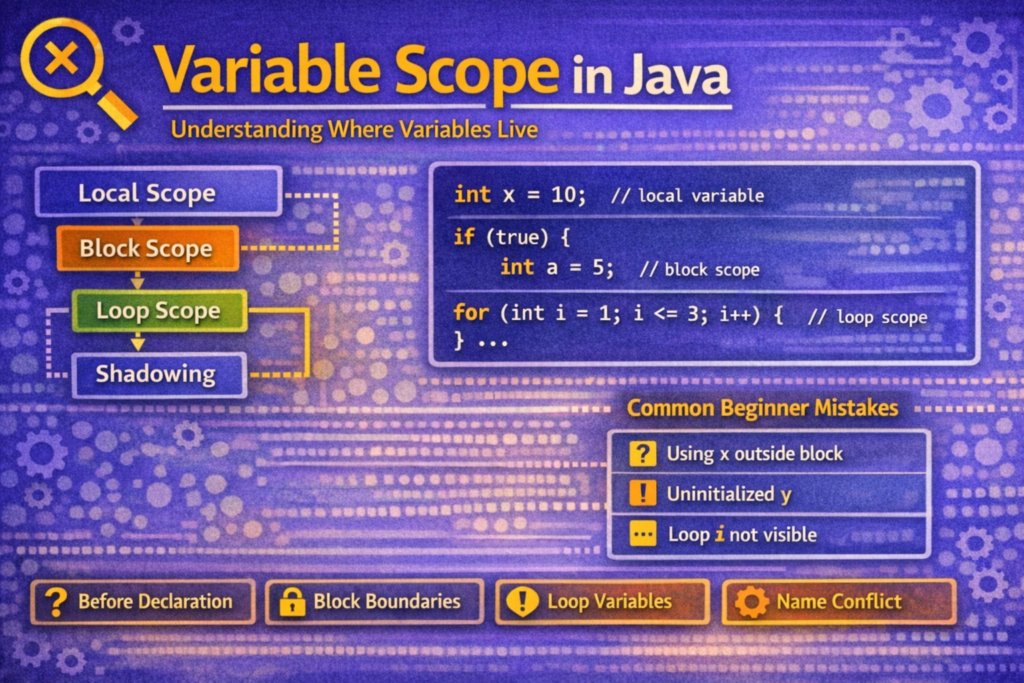
🧩 Types of Variable Scope in Java
From a beginner’s point of view, variable scope can be understood using:
🔹 Local Scope
🔹 Block Scope
🔹 Loop Scope
(We will talk about class-level scope only once at the end, as requested.)
🔹 Local Scope
📌 What is Local Scope?
A variable declared inside a method or code area has local scope.
It is accessible only where it is declared.
✅ Example: Local Variable
int x = 10;
System.out.println(x);
✔ x can be used after declaration
✔ Works only inside the same method or area
❌ Common Mistake: Using Variable Before Declaration
System.out.println(x); // ❌ Error
int x = 10;
📌 Variables must be declared before use.
⚠️ Important Rule
Local variables do not get default values.
int y;
System.out.println(y); // ❌ Compile-time error
✔ You must initialize local variables manually.
🔹 Block Scope
📌 What is Block Scope?
A block is any code written inside { }.
Variables declared inside a block are accessible only inside that block.
✅ Example: Block Scope Using if
if (true) {
    int a = 5;
    System.out.println(a);
}
✔ a is valid inside the if block.
❌ Accessing Block Variable Outside
if (true) {
    int a = 5;
}
System.out.println(a); // ❌ Error
📌 a is destroyed once the block ends.
🔹 Loop Scope (Very Common Confusion)
📌 Variables Inside Loops
for (int i = 1; i <= 3; i++) {
    System.out.println(i);
}
✔ i exists only inside the loop.
❌ Using Loop Variable Outside
for (int i = 1; i <= 3; i++) {
    System.out.println(i);
}
System.out.println(i); // ❌ Error
📌 Loop variables are block-scoped.
⚠️ Tricky Scope Confusions
🔹 Same Variable Name in Different Blocks
{
    int x = 10;
    System.out.println(x);
}
{
    int x = 20;
    System.out.println(x);
}
✔ Valid code
📌 Each block has its own scope
🔹 Variable Updated Inside Block
int x = 10;

if (x > 5) {
    x = 20;
}

System.out.println(x);
✔ Output:
20
📌 Variables declared outside blocks can be modified inside blocks.
❗ Shadowing Confusion (Without Class)
📌 What is Shadowing?
When a variable declared in a smaller scope has the same name as one in a larger scope, the smaller one is used.
⚠️ Tricky Example
int x = 10;

{
    int x = 20; // ❌ Not allowed
}
📌 Java does not allow redeclaration of a variable in overlapping scope.
✅ Correct Way
int x = 10;

{
    int y = 20;
    System.out.println(x);
    System.out.println(y);
}
⚠️ Common Beginner Mistakes
| Mistake | Why It Happens |
|---|---|
| Using variable outside block | Scope misunderstanding |
| Using local variable without initialization | No default values |
| Expecting loop variable to exist outside | Loop scope confusion |
| Reusing variable names carelessly | Poor scope awareness |
🧪 One Class-Level Example (As Requested)
class Demo {
    int x = 10;   // instance variable

    void show() {
        int x = 20; // local variable
        System.out.println(x);
    }
}
✔ Output:
20
📌 Local variable x hides instance variable x
📌 This is called variable shadowing
🧠 How to Think About Variable Scope
Before using a variable, ask:
- Where was it declared?
- Inside which
{ }? - Has the block ended?
- Am I trying to reuse a name incorrectly?
If you answer these, scope problems disappear.
📝 Conclusion
Variable scope in Java defines where a variable can be accessed and how long it exists. Most beginner errors are not syntax problems but scope-related logical mistakes.
To master variable scope:
- Understand block boundaries
{ } - Declare variables as close as possible to their use
- Never assume a variable exists outside its block
- Be careful with variable names
A clear understanding of variable scope makes loops, conditions, and future OOP concepts much easier to learn and debug.