👋 Writing Your First Hello World Program in Java
📌 Introduction
The Hello World program is traditionally the first program written in any programming language. It helps beginners understand the basic structure of a program, how code is written, compiled, and executed.
In Java, this program introduces several important concepts such as:
- Class structure
- The
mainmethod - Keywords
- Compilation and execution process
🧱 Structure of a Java Program
📌 Basic Building Blocks
A Java program is composed of:
- A class
- A main method
- Statements inside the method
Every Java application starts execution from the main method.
🧪 Hello World Program in Java
📘 Program Code
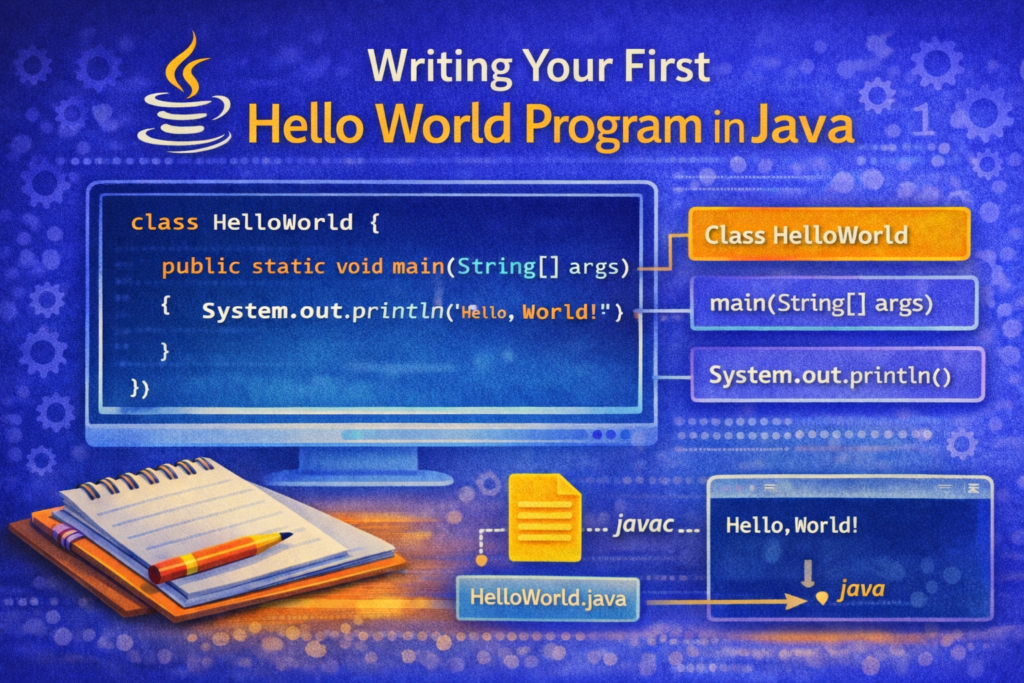
class HelloWorld {
    public static void main(String[] args) {
        System.out.println("Hello, World!");
    }
}
🔍 Line-by-Line Explanation (VERY IMPORTANT)
🔹 class HelloWorld
📌 What is a Class?
A class is a blueprint that contains:
- Data
- Methods
- Instructions for the program
In Java, every program must have at least one class.
📌 Class Name Rules
- Must start with a letter
- Cannot contain spaces
- Usually written in PascalCase
- File name must match class name
✔ Correct:
class HelloWorld
❌ Incorrect:
class hello world
🔹 public static void main(String[] args)
📌 What is the main Method?
The main method is the entry point of a Java program.
Execution always starts from main.
🔹 Breakdown of main Method Keywords
🔸 public
- Makes the method accessible from anywhere
- JVM must be able to access
main
🔸 static
- Allows JVM to call
mainwithout creating an object - Memory efficient for startup
🔸 void
- Specifies that the method returns nothing
🔸 main
- Special method name recognized by JVM
- Execution begins here
🔸 String[] args
- Command-line arguments
- Used to pass data at runtime
argsis just a variable name
Example:
java HelloWorld Ajay Java
🔹 System.out.println("Hello, World!");
📌 Purpose
Prints output to the console.
🧠 Explanation
System→ predefined classout→ output streamprintln→ prints text and moves cursor to next line
⚙️ How Java Program Execution Works
📌 Two-Step Process
Java uses a two-step execution model:
- Compilation
- Execution
🛠️ Step 1: Compiling the Program
📌 Save the File
File name must match class name:
HelloWorld.java
📌 Compile Using javac
javac HelloWorld.java
✔ If no error → compilation successful
✔ Generates:
HelloWorld.class
🧠 What Happens During Compilation?
- Source code is converted to bytecode
- Syntax errors are checked
- Bytecode is platform-independent
▶️ Step 2: Running the Program
📌 Run Using java
java HelloWorld
✔ Output:
Hello, World!
⚠️ Important Rule
Do not include .java or .class while running.
❌ Wrong:
java HelloWorld.java
✔ Correct:
java HelloWorld
📊 Flow of Execution (Conceptual)
HelloWorld.java
   ↓ (javac)
HelloWorld.class
   ↓ (JVM)
Output on Screen
⚠️ Common Mistakes Beginners Make
❌ Mistake 1: File Name and Class Name Mismatch
class HelloWorld {
}
Saved as:
Test.java
❌ Compilation error
❌ Mistake 2: Missing main Method
class HelloWorld {
}
❌ Program compiles but does not run
❌ Mistake 3: Wrong Case in Keywords
Public static void main(...)
❌ Java is case-sensitive
❌ Mistake 4: Missing Semicolon
System.out.println("Hello World")
❌ Syntax error
❌ Mistake 5: Using Quotes Incorrectly
System.out.println('Hello World');
❌ Single quotes are for characters, not strings
🧠 Why Java Needs This Structure
📌 Reasons
- Supports Object-Oriented Programming
- Ensures uniform execution
- Enables platform independence
- Allows JVM to manage execution
📘 Real-World Importance
Even though it is simple, the Hello World program:
- Introduces Java syntax
- Teaches compilation and execution
- Builds foundation for all future programs
Every complex Java application starts with this structure.
📌 Summary
- Java programs start with a class
- Execution begins from main method
javaccompiles source codejavaexecutes bytecode- File name must match class name
- Java follows a strict but powerful structure
🏁 Conclusion
The Hello World program is more than just printing text—it introduces the core architecture of Java programming. Understanding each component of this program lays the foundation for learning variables, operators, control statements, object-oriented concepts, and advanced Java topics.