Introduction
The for loop is one of the most essential tools in Java programming. It helps you repeat tasks with precision and control, especially when the number of repetitions is known. Beginners often understand its syntax but miss the logic behind it — which leads to mistakes. This article focuses only on the for loop and explains it in a way that clears confusion and builds confidence.
📌 What Is a for Loop?
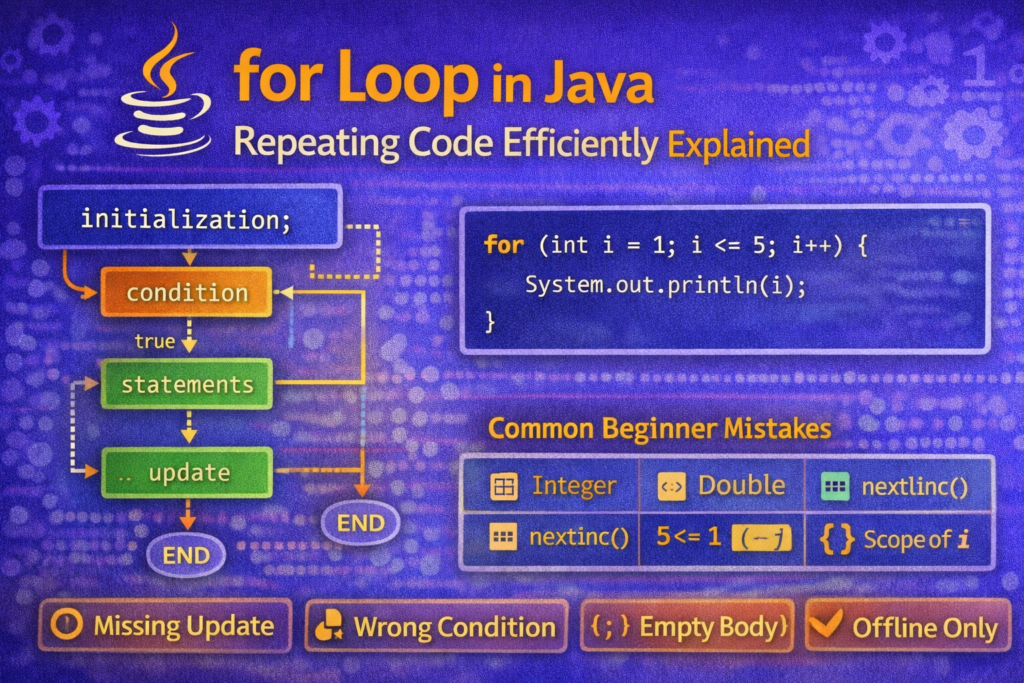
A for loop lets you repeat a block of code multiple times with a clear start, condition for continuation, and update after each repetition.
General form:
for (initialization; condition; update) {
    // body
}
💡 What Each Part Means
- Initialization — Sets the start point (runs once)
- Condition — Checked before each iteration
- Update — Changes loop variable (runs after each iteration)
- Body — Code that runs each time the condition is true
👍 Basic Example
for (int i = 1; i <= 5; i++) {
    System.out.println(i);
}
✔ Output:
1
2
3
4
5
👀 What happens under the hood:
1️⃣ i = 1 (initialization)
2️⃣ Check i <= 5 (true)
3️⃣ Run body
4️⃣ i++ (update)
Repeat until condition fails
⚠ Common Mistakes & Confusions
❌ Mistake 1 — Wrong Condition Symbols
for (int i = 1; i = 5; i++) // ❌ WRONG
➡️ This causes a compile error because = is an assignment, not a condition.
✔ Correct:
for (int i = 1; i == 5; i++)
but this still rarely makes sense; usually you want < or <=.
❌ Mistake 2 — Off-by-One Errors
for (int i = 1; i < 5; i++)
✔ Output:
1
2
3
4
✔ But if you expected 5 also, you need:
for (int i = 1; i <= 5; i++)
👉 This one small symbol is a huge source of bugs.
❌ Mistake 3 — Loop Variable Scoped Outside?
for (int i = 1; i <= 3; i++) {
    System.out.println(i);
}
System.out.println(i);  // ❌ ERROR
💡 i is only visible inside the loop.
❌ Mistake 4 — Unintended Infinite Loop
for (int i = 1; i <= 3; ) {
    System.out.println("Oops");
}
✔ No update → condition always true → infinite loop.
❌ Mistake 5 — Accidental Semicolon
for (int i = 1; i <= 5; i++);  // ❌ <-- notice ;
{
    System.out.println("Hello");
}
😵 This runs the loop without body and then prints "Hello" once. Sneaky!
🧠 Tricky for Loop Examples
🌀 Multiple Variables
for (int i = 1, j = 5; i <= j; i++, j--) {
    System.out.println(i + " " + j);
}
✔ Output:
1 5
2 4
3 3
✔ You can initialize and update multiple variables as long as they are of the same type.
🔁 No Initialization
int i = 1;
for (; i <= 3; i++) {
    System.out.println(i);
}
✔ Initialization can be outside — loop still works.
♾ Infinite Loop (Explicit)
for (;;) {
    System.out.println("Forever!");
}
✔ All parts of a for loop are optional.
↕ Reversing with for
for (int i = 5; i >= 1; i--) {
    System.out.println(i);
}
✔ Great for counting down.
🔥 Using break
for (int i = 1; i <= 10; i++) {
    if (i == 5) {
        break;
    }
    System.out.println(i);
}
✔ Stops the loop before completion.
✔ Output:
1
2
3
4
🔄 Using continue
for (int i = 1; i <= 5; i++) {
    if (i % 2 == 0) {
        continue;
    }
    System.out.println(i);
}
✔ Skips even numbers.
✔ Output:
1
3
5
💭 Quick Recap
✍ The for loop is simple but powerful when you understand:
- Order of execution
- How conditions control flow
- How tiny mistakes change behavior
🧠 Always trace loops step by step to see how values change.
🚀 Summary – Key Tips for Students
✔ Know the difference between <, <=, ==, and =
✔ Watch for missing updates
✔ Avoid unintended semicolons
✔ Use break and continue intentionally
✔ Practice dry-running loops with pencil and paper