Module II · Two-Dimensional Arrays · Lecture 21
🎯 Why This Matters
In the last post we used a 1-D array to store a single list of values, like the marks of one student. But a lot of real data is not a single list. It is a table: marks of 3 students in 4 subjects, a seating plan with rows and columns, the squares of a chess board, or a mathematical matrix.
A two-dimensional (2-D) array is exactly this: an array with rows and columns. You can think of it as “an array of arrays”. In this post we will learn how to declare it, give it values, reach any single element, display it, and even see how C stores it in memory.
1️⃣ Declaring a 2-D Array
A 2-D array needs two sizes in square brackets: the number of rows first, then the number of columns.
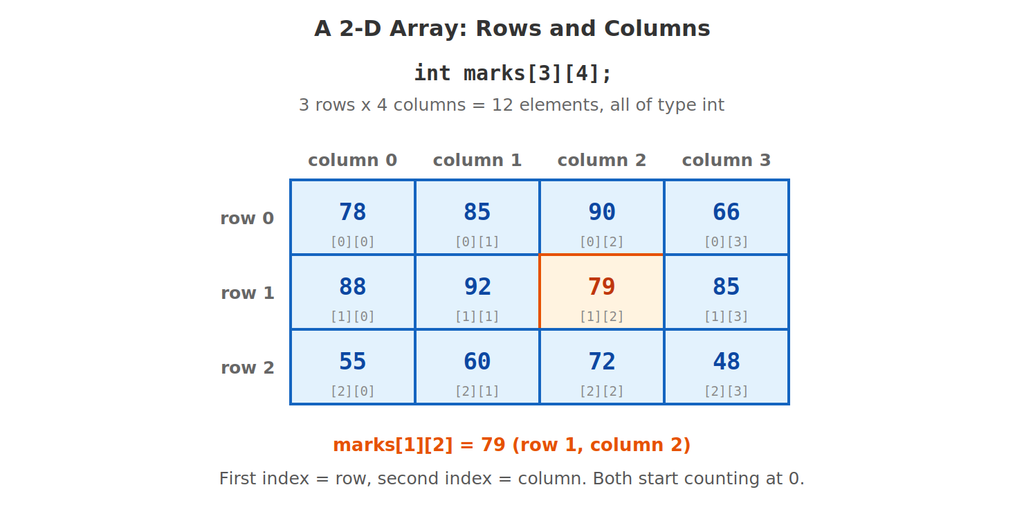
int marks[3][4];This creates a table with 3 rows and 4 columns, which is 3 × 4 = 12 boxes, all of type int. To reach one box you give two indexes: first the row, then the column. Just like 1-D arrays, both indexes start at 0. So the rows are numbered 0, 1, 2 and the columns 0, 1, 2, 3.
Example 1: Storing and Reading Individual Elements
#include <stdio.h>

int main() {
    int marks[3][4];

    marks[0][0] = 78;
    marks[1][2] = 79;
    marks[2][3] = 48;

    printf("marks[0][0] = %d\n", marks[0][0]);
    printf("marks[1][2] = %d\n", marks[1][2]);
    printf("marks[2][3] = %d\n", marks[2][3]);

    return 0;
}
🖥️ Output:
marks[0][0] = 78
marks[1][2] = 79
marks[2][3] = 48
marks[1][2] means “go to row 1, then column 2”. The first index always picks the row, and the second picks the column. For an array declared as [R][C], the last valid element is [R - 1][C - 1], which here is marks[2][3].
Example 2: How Big Is My Array?
#include <stdio.h>

int main() {
    int marks[3][4];

    int rows = sizeof(marks) / sizeof(marks[0]);
    int cols = sizeof(marks[0]) / sizeof(marks[0][0]);

    printf("Rows = %d\n", rows);
    printf("Columns = %d\n", cols);
    printf("Total elements = %d\n", rows * cols);
    printf("Total bytes = %zu\n", sizeof(marks));

    return 0;
}
🖥️ Output:
Rows = 3
Columns = 4
Total elements = 12
Total bytes = 48
This extends the sizeof trick from the 1-D post. sizeof(marks) is the whole table (48 bytes), sizeof(marks[0]) is one row (16 bytes), and sizeof(marks[0][0]) is one element (4 bytes). So rows = 48 / 16 = 3 and columns = 16 / 4 = 4.
2️⃣ Initializing a 2-D Array
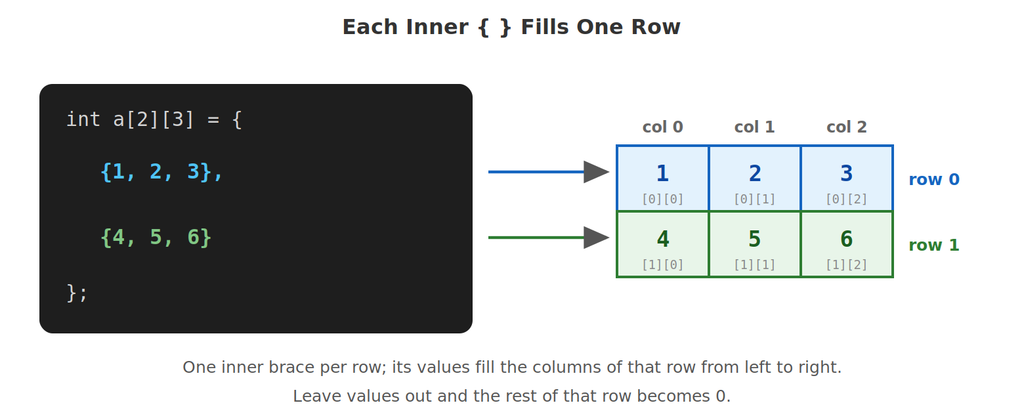
The neatest way to give a 2-D array its values is with nested braces: one inner { } for each row.
Example 3: Different Ways to Initialize
#include <stdio.h>

int main() {
    int a[2][3] = {{1, 2, 3}, {4, 5, 6}};             // one { } per row
    int b[2][3] = {1, 2, 3, 4, 5, 6};                 // filled row by row
    int c[][3] = {{7, 8, 9}, {10, 11, 12}, {13, 14, 15}};  // rows counted for us
    int d[2][3] = {{1}, {4, 5}};                      // missing values become 0
    int e[2][3] = {0};                                // everything becomes 0

    int crows = sizeof(c) / sizeof(c[0]);

    printf("a:\n");
    for (int i = 0; i < 2; i++) {
        for (int j = 0; j < 3; j++) {
            printf("%d ", a[i][j]);
        }
        printf("\n");
    }

    printf("d:\n");
    for (int i = 0; i < 2; i++) {
        for (int j = 0; j < 3; j++) {
            printf("%d ", d[i][j]);
        }
        printf("\n");
    }

    printf("e:\n");
    for (int i = 0; i < 2; i++) {
        for (int j = 0; j < 3; j++) {
            printf("%d ", e[i][j]);
        }
        printf("\n");
    }

    printf("b[1][0] = %d\n", b[1][0]);
    printf("c has %d rows\n", crows);

    return 0;
}
🖥️ Output:
a:
1 2 3
4 5 6
d:
1 0 0
4 5 0
e:
0 0 0
0 0 0
b[1][0] = 4
c has 3 rows
(The loops that print the arrays are explained in the next section. For now, just look at the results.)
| Form | What you get |
|---|---|
int a[2][3] = {{1, 2, 3}, {4, 5, 6}}; | Clearest form: each inner brace is one row |
int b[2][3] = {1, 2, 3, 4, 5, 6}; | Works too: values fill row 0, then row 1. But it is harder to read |
int c[][3] = {{7,8,9}, {10,11,12}, {13,14,15}}; | C counts the rows for you (3). The column size is still required |
int d[2][3] = {{1}, {4, 5}}; | Values you leave out become 0 |
int e[2][3] = {0}; | Quick way to set every element to 0 |
⚠️ The column size can never be left out. C is happy to count the rows for you, but it must be told how many columns there are, otherwise it cannot work out where one row ends and the next begins (you will see why in the memory section). And as with 1-D arrays, a 2-D array with no initial values holds garbage.
3️⃣ Accessing Individual Elements
Example 4: Reading and Changing One Element
#include <stdio.h>

int main() {
    int a[3][3] = {{1, 2, 3}, {4, 5, 6}, {7, 8, 9}};

    printf("First = %d, Centre = %d, Last = %d\n", a[0][0], a[1][1], a[2][2]);

    a[1][2] = 60;
    printf("After change: a[1][2] = %d\n", a[1][2]);

    a[0][0] = a[0][0] + a[2][2];
    printf("a[0][0] is now %d\n", a[0][0]);

    return 0;
}
🖥️ Output:
First = 1, Centre = 5, Last = 9
After change: a[1][2] = 60
a[0][0] is now 10
Every element a[i][j] behaves like an ordinary variable. You can print it, overwrite it, or use it in a calculation. The first element is always a[0][0] (top-left corner) and the last is a[rows-1][cols-1] (bottom-right corner).
4️⃣ Traversal: Visiting Every Element with Nested Loops
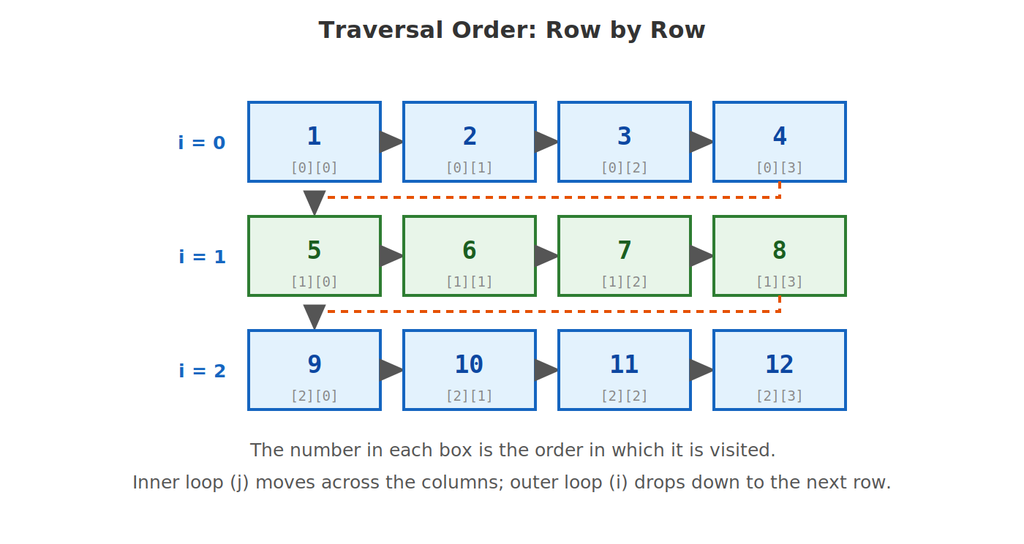
To go through a 1-D array you needed one loop. A 2-D array has two dimensions, so you need two loops, one inside the other. The outer loop picks the row. For each row, the inner loop runs across all the columns.
Example 5: Displaying a 2-D Array as a Table
#include <stdio.h>

int main() {
    int m[3][4] = {{1, 2, 3, 4}, {5, 6, 7, 8}, {9, 10, 11, 12}};

    for (int i = 0; i < 3; i++) {          // each row
        for (int j = 0; j < 4; j++) {      // each column in that row
            printf("%4d", m[i][j]);
        }
        printf("\n");                      // new line after every row
    }

    return 0;
}
🖥️ Output: 1 2 3 4 5 6 7 8 9 10 11 12
There are two small details that make this look like a proper table. The format %4d prints each number in a field 4 characters wide, so the columns line up (a trick from the Formatted Input/Output post). And the printf("\n") sits after the inner loop but inside the outer loop, so a new line starts after each complete row, not after each number.
Example 6: Reading a 2-D Array from the User
#include <stdio.h>

int main() {
    int m[2][3];

    for (int i = 0; i < 2; i++) {
        for (int j = 0; j < 3; j++) {
            printf("Enter m[%d][%d]: ", i, j);
            scanf("%d", &m[i][j]);
        }
    }

    printf("\nYou entered:\n");
    for (int i = 0; i < 2; i++) {
        for (int j = 0; j < 3; j++) {
            printf("%d ", m[i][j]);
        }
        printf("\n");
    }

    return 0;
}
🖥️ Sample run:
Enter m[0][0]: 1
Enter m[0][1]: 2
Enter m[0][2]: 3
Enter m[1][0]: 4
Enter m[1][1]: 5
Enter m[1][2]: 6
You entered:
1 2 3
4 5 6
The prompt shows exactly which element is being filled, which helps the user. Notice that &m[i][j] gives scanf the address of one particular box, the same idea as &nums[i] in the 1-D post.
🧭 How a 2-D Array Is Stored in Memory
We draw a 2-D array as a table, but computer memory is just one long line of boxes. So C stores the array row after row: all of row 0 first, then all of row 1, and so on. This is called row-major order.
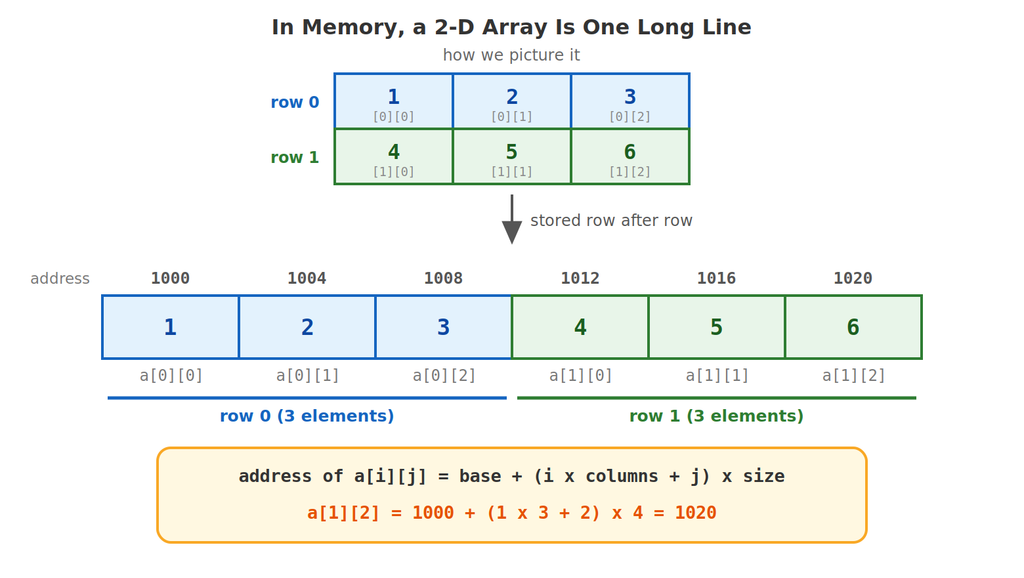
To find a[i][j], C first skips i complete rows (each has cols elements), then moves j more elements into the row:
address of a[i][j] = base + (i × columns + j) × (size of one element)
This is why the column size is compulsory in a declaration: the formula needs columns to know how big each “skip” is. It is also the 2-D version of the address formula from the 1-D post.
Example 7: Checking the Memory Layout
#include <stdio.h>

int main() {
    int a[2][3] = {{1, 2, 3}, {4, 5, 6}};

    for (int i = 0; i < 2; i++) {
        for (int j = 0; j < 3; j++) {
            printf("a[%d][%d] is %lu bytes from a[0][0]\n", i, j,
                   (unsigned long)&a[i][j] - (unsigned long)&a[0][0]);
        }
    }

    printf("Formula for a[1][2]: (%d x %d + %d) x %zu = %zu\n",
           1, 3, 2, sizeof(int), (size_t)((1 * 3 + 2) * sizeof(int)));

    return 0;
}
🖥️ Output:
a[0][0] is 0 bytes from a[0][0]
a[0][1] is 4 bytes from a[0][0]
a[0][2] is 8 bytes from a[0][0]
a[1][0] is 12 bytes from a[0][0]
a[1][1] is 16 bytes from a[0][0]
a[1][2] is 20 bytes from a[0][0]
Formula for a[1][2]: (1 x 3 + 2) x 4 = 20
The distances go up smoothly in steps of 4 bytes: 0, 4, 8, 12, 16, 20. There is no gap between the end of row 0 (a[0][2] at 8) and the start of row 1 (a[1][0] at 12). It really is one continuous line, and the formula predicts the 20 bytes for a[1][2] exactly.
🔧 Manipulating 2-D Arrays
Once you can traverse a 2-D array, many useful operations become small variations on the same two nested loops.
Example 8: Sum of All Elements, Each Row and Each Column
#include <stdio.h>

int main() {
    int m[3][3] = {{1, 2, 3}, {4, 5, 6}, {7, 8, 9}};
    int total = 0;

    for (int i = 0; i < 3; i++) {
        for (int j = 0; j < 3; j++) {
            total += m[i][j];
        }
    }
    printf("Sum of all elements = %d\n", total);

    for (int i = 0; i < 3; i++) {
        int rowSum = 0;
        for (int j = 0; j < 3; j++) {
            rowSum += m[i][j];
        }
        printf("Sum of row %d = %d\n", i, rowSum);
    }

    for (int j = 0; j < 3; j++) {
        int colSum = 0;
        for (int i = 0; i < 3; i++) {
            colSum += m[i][j];
        }
        printf("Sum of column %d = %d\n", j, colSum);
    }

    return 0;
}
🖥️ Output:
Sum of all elements = 45
Sum of row 0 = 6
Sum of row 1 = 15
Sum of row 2 = 24
Sum of column 0 = 12
Sum of column 1 = 15
Sum of column 2 = 18
For row sums, the outer loop picks the row and the inner loop adds across the columns. For column sums we simply swap the loops: now the outer loop picks the column j and the inner loop walks down the rows i. Notice that rowSum and colSum are declared inside the outer loop, so each one restarts at 0 for every new row or column.
Example 9: Largest Element and Where It Is
#include <stdio.h>

int main() {
    int m[2][3] = {{12, 45, 7}, {33, 90, 21}};
    int max = m[0][0], r = 0, c = 0;

    for (int i = 0; i < 2; i++) {
        for (int j = 0; j < 3; j++) {
            if (m[i][j] > max) {
                max = m[i][j];
                r = i;
                c = j;
            }
        }
    }

    printf("Largest = %d at row %d, column %d\n", max, r, c);

    return 0;
}
🖥️ Output:
Largest = 90 at row 1, column 1
This is the “largest value” idea from the 1-D post, but now we also remember both indexes, r for the row and c for the column, every time a new maximum is found.
Example 10: The Two Diagonals of a Square Matrix
#include <stdio.h>

int main() {
    int a[3][3] = {{1, 2, 3}, {4, 5, 6}, {7, 8, 9}};
    int mainSum = 0, otherSum = 0;

    printf("Main diagonal: ");
    for (int i = 0; i < 3; i++) {
        printf("%d ", a[i][i]);
        mainSum += a[i][i];
    }
    printf("\nSum of main diagonal = %d\n", mainSum);

    printf("Other diagonal: ");
    for (int i = 0; i < 3; i++) {
        printf("%d ", a[i][2 - i]);
        otherSum += a[i][2 - i];
    }
    printf("\nSum of other diagonal = %d\n", otherSum);

    return 0;
}
🖥️ Output:
Main diagonal: 1 5 9
Sum of main diagonal = 15
Other diagonal: 3 5 7
Sum of other diagonal = 15
Only one loop is needed here, because we only visit 3 specific elements. The main diagonal is where the row and column are equal: a[0][0], a[1][1], a[2][2]. The other diagonal has the column counting down as the row counts up: a[0][2], a[1][1], a[2][0], which is a[i][2 - i].
Example 11: Adding Two Matrices
#include <stdio.h>

int main() {
    int A[2][3] = {{1, 2, 3}, {4, 5, 6}};
    int B[2][3] = {{10, 20, 30}, {40, 50, 60}};
    int C[2][3];

    for (int i = 0; i < 2; i++) {
        for (int j = 0; j < 3; j++) {
            C[i][j] = A[i][j] + B[i][j];
        }
    }

    printf("Result:\n");
    for (int i = 0; i < 2; i++) {
        for (int j = 0; j < 3; j++) {
            printf("%d ", C[i][j]);
        }
        printf("\n");
    }

    return 0;
}
🖥️ Output:
Result:
11 22 33
44 55 66
To add two matrices, add the elements that sit in the same position: C[i][j] = A[i][j] + B[i][j]. Both matrices must have the same number of rows and columns.
Example 12: Transpose of a Matrix
The transpose of a matrix swaps its rows and columns: row 0 becomes column 0, row 1 becomes column 1, and so on.
#include <stdio.h>

int main() {
    int a[2][3] = {{1, 2, 3}, {4, 5, 6}};
    int t[3][2];

    for (int i = 0; i < 2; i++) {
        for (int j = 0; j < 3; j++) {
            t[j][i] = a[i][j];
        }
    }

    printf("Original:\n");
    for (int i = 0; i < 2; i++) {
        for (int j = 0; j < 3; j++) {
            printf("%d ", a[i][j]);
        }
        printf("\n");
    }

    printf("Transpose:\n");
    for (int i = 0; i < 3; i++) {
        for (int j = 0; j < 2; j++) {
            printf("%d ", t[i][j]);
        }
        printf("\n");
    }

    return 0;
}
🖥️ Output:
Original:
1 2 3
4 5 6
Transpose:
1 4
2 5
3 6
The whole idea is the single line t[j][i] = a[i][j];: the indexes are swapped. A 2×3 matrix becomes a 3×2 matrix, so the new array is declared as t[3][2], with rows and columns the other way round.
Example 13: A Real-Life Table: Student Marks
#include <stdio.h>

int main() {
    int marks[3][4] = {{78, 85, 90, 66},
                       {88, 92, 79, 85},
                       {55, 60, 72, 48}};

    for (int i = 0; i < 3; i++) {
        int total = 0;
        for (int j = 0; j < 4; j++) {
            total += marks[i][j];
        }
        printf("Student %d: total = %d, average = %.2f\n", i + 1, total, (float) total / 4);
    }

    return 0;
}
🖥️ Output:
Student 1: total = 319, average = 79.75
Student 2: total = 344, average = 86.00
Student 3: total = 235, average = 58.75
Each row is one student and each column is one subject. The inner loop adds up one student’s four subjects, and we print the result before the outer loop moves on to the next student. This is exactly the kind of problem 2-D arrays were made for.
🚫 Common Mistakes Beginners Make
| Mistake | What really happens |
|---|---|
Mixing up the order: writing [column][row] | The first index is always the row, the second is the column |
Using i <= rows or j <= cols in the loops | The loop goes one step too far and touches elements that do not exist |
Leaving out the column size, like int a[2][] | Compile error. Only the first (row) size may be left out |
Putting printf("\n") inside the inner loop | Every number goes on its own line, so you do not get a table |
| Not resetting a row or column sum to 0 | Sums from earlier rows carry over into later ones |
Writing a[1, 2] instead of a[1][2] | See below |
Going Outside the Array (Again)
// DO NOT RELY ON THIS:
int a[2][3];
a[2][0] = 5;    // row 2 does not exist (rows are 0 and 1)
a[0][3] = 5;    // column 3 does not exist (columns are 0, 1, 2)
Just like with 1-D arrays, C does not check the bounds. Because 2-D arrays are stored as one line, a[0][3] may quietly land on a[1][0], so the program writes to the wrong element without any error message. Always keep i between 0 and rows - 1 and j between 0 and cols - 1.
The Comma Trap
In some languages you write a[1, 2] to reach a table element. In C this is wrong. Remember the comma operator from the Special Operators post: 1, 2 evaluates to just 2, so a[1, 2] quietly means a[2], which is a whole row, not a single number. In C every index gets its own pair of square brackets: a[1][2].
🎓 Practice Exercises
Exercise 1: Predict the Output
int a[2][3] = {{1, 2}, {3}};
printf("%d %d %d", a[0][2], a[1][0], a[1][2]);
(Answer: 0 3 0. The values you did not list become 0.)
Exercise 2: Size Questions
For int t[4][5]; how many elements does it have, how many bytes does it use (with 4-byte ints), and what is its last valid element?
(Answer: 4 × 5 = 20 elements, 20 × 4 = 80 bytes, and the last valid element is t[3][4].)
Exercise 3: Address Calculation
An int a[3][3] array has base address 3000. What is the address of a[2][1]?
(Answer: 3000 + (2 × 3 + 1) × 4 = 3000 + 28 = 3028.)
Exercise 4: Predict the Output
int a[3][2] = {{1, 2}, {3, 4}, {5, 6}};
int sum = 0;
for (int i = 0; i < 3; i++) {
    sum += a[i][1];
}
printf("%d", sum);
(Answer: 12. It adds column 1 only: 2 + 4 + 6.)
Exercise 5: Predict the Output
int a[2][2] = {{1, 2}, {3, 4}};
for (int i = 0; i < 2; i++) {
    printf("%d ", a[i][1 - i]);
}
(Answer: 2 3. For i = 0 it prints a[0][1] and for i = 1 it prints a[1][0], the other diagonal.)
Exercise 6: Build It Yourself
Write a program that reads a 3×3 matrix from the user, then prints it as a table and displays the sum of each row and the sum of each column.
❓ Frequently Asked Questions
Q: Which index is the row and which is the column?
In a[i][j], the first index i is the row and the second index j is the column. The declaration follows the same order: int a[rows][cols];.
Q: Is a 2-D array really stored as a table in memory?
No. Memory is one long line, so the rows are stored one after another (row-major order). The table is just how we picture it. C uses the formula base + (i × cols + j) × size to find any element.
Q: Why can I leave out the number of rows but not the number of columns?
C can count the rows from your initializer. But to calculate an address it must know how many elements make up each row, and it has no way to guess that.
Q: Can I have a 3-D array?
Yes. Just add one more pair of brackets, like int cube[2][3][4];. The same ideas apply with one more index and one more nested loop. For now, 2-D is plenty.
Q: Do rows always need the same length?
In a 2-D array declared like int a[3][4], yes: every row has exactly 4 columns. That is what keeps it a neat rectangle.
✅ Key Takeaways
- A 2-D array is a table with rows and columns, declared as
type name[rows][cols];and used with two indexes:a[i][j]whereiis the row andjis the column. - Both indexes start at 0, so the last element is
a[rows - 1][cols - 1]. C does not check the bounds. - Initialize with nested braces, one inner
{ }per row. Missing values become 0, the row size can be left out, but the column size is always required. - Traversal uses two nested loops: the outer loop picks the row, the inner loop walks across the columns. Put the line break after the inner loop.
- In memory a 2-D array is one continuous line, stored row after row. The address of
a[i][j]isbase + (i × cols + j) × size. - Row sums, column sums, diagonals, matrix addition and transpose are all small variations of the same nested-loop pattern.
🚀 Keep practising: Try the exercises on paper first, then run your own versions. Most mistakes with 2-D arrays come from mixing up rows and columns, so say “row first, then column” out loud whenever you write
a[i][j].