Module I · Loop Control Structure · Lecture 17
🎯 Why This Matters
Back in the Algorithms post, several algorithms shared the exact same shape — a counter starting at 1, a condition checking whether to keep going, and a step that moved the counter forward — all wrapped around a “jump backward” arrow in the matching flowchart. That entire pattern has a name in C: it’s a for loop, and it’s the tool built specifically for definite repetition — repeating something a known, countable number of times. This post covers for in full, with a working program for nearly every use case, matching this lecture’s focus on multiplication tables, sums, and numerical sequences.
🔷 Anatomy of a for Loop
#include <stdio.h>

int main() {
    int i;

    for (i = 1; i <= 5; i++) {
        printf("%d\n", i);
    }

    return 0;
}
🖥️ Output:
1
2
3
4
5
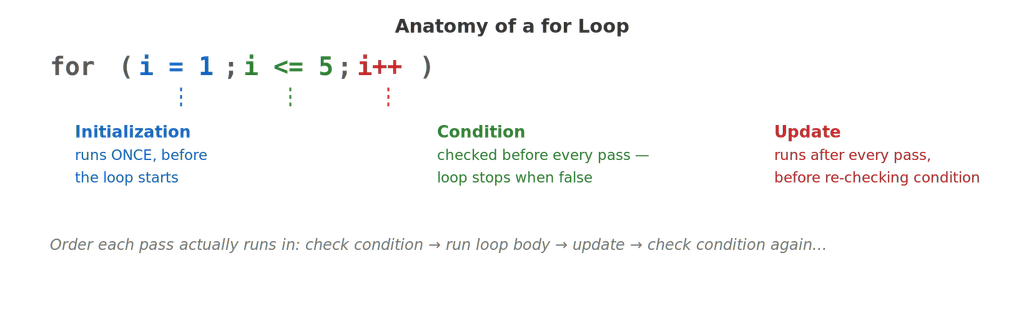
All three pieces sit inside a single set of parentheses, separated by semicolons: for (initialization; condition; update). This is the exact same three-part shape as the flowchart’s counter setup, decision diamond, and step — just packed into one line instead of three separate boxes.
🌀 Tracing the Flow, Step by Step
#include <stdio.h>

int main() {
    for (int i = 1; i <= 3; i++) {
        printf("Pass %d: i is now %d\n", i, i);
    }

    return 0;
}
🖥️ Output:
Pass 1: i is now 1
Pass 2: i is now 2
Pass 3: i is now 3
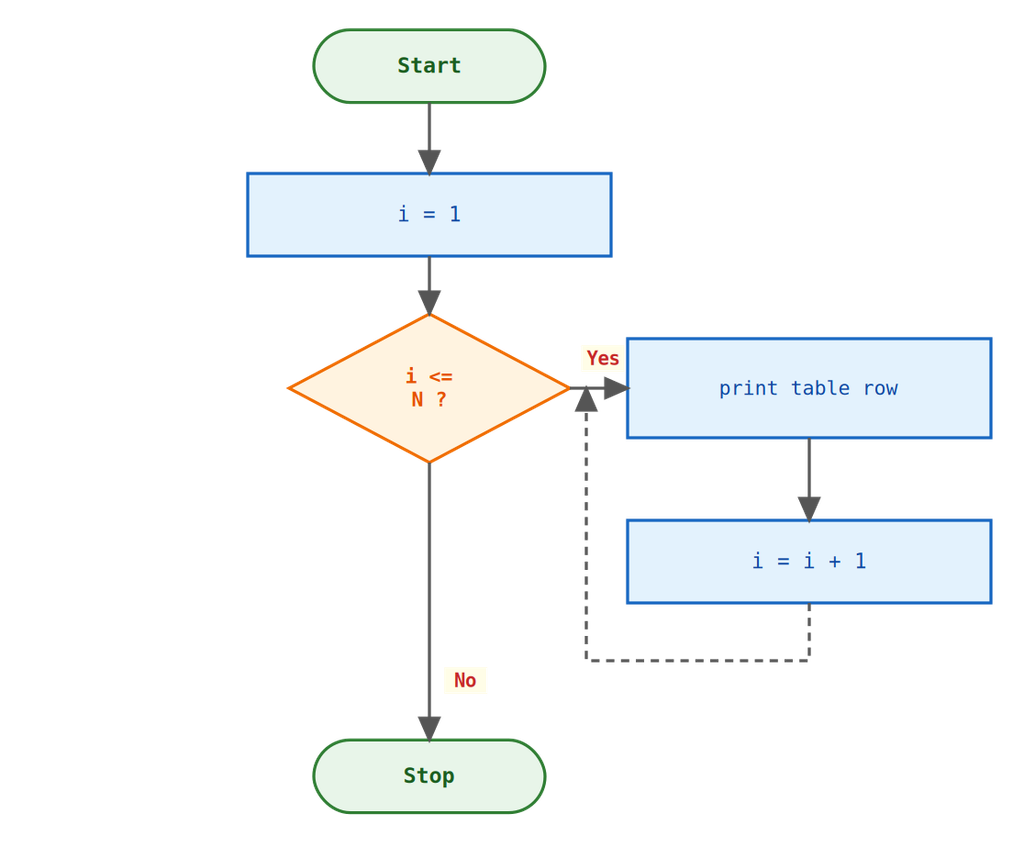
Trace it exactly as the flowchart shows: i = 1 runs once. Then C checks i <= 3 (true) → runs the body → runs i++ (now i = 2) → checks the condition again (true) → runs the body → and so on, until i becomes 4 and the condition finally goes false. Notice int i is declared directly inside the for(...) — a common C style that keeps the counter scoped to the loop itself.
🧑🎓 The Lecture Activity: Multiplication Tables
#include <stdio.h>

int main() {
    int n = 7;

    for (int i = 1; i <= 10; i++) {
        printf("%d x %d = %d\n", n, i, n * i);
    }

    return 0;
}
🖥️ Output:
7 x 1 = 7
7 x 2 = 14
7 x 3 = 21
…
7 x 10 = 70
This is exactly Algorithm 12 from the Algorithms post — printing a multiplication table — but where that version was hand-traced as “Counter = 1, print, Counter = Counter + 1, jump back,” the for loop expresses all three of those moving parts in a single line, and C handles the bookkeeping automatically.
Generating Every Table From 1 to 10 (Nested Preview)
#include <stdio.h>

int main() {
    for (int n = 1; n <= 3; n++) {
        printf("--- Table of %d ---\n", n);
        for (int i = 1; i <= 5; i++) {
            printf("%d x %d = %d\n", n, i, n * i);
        }
    }

    return 0;
}
🖥️ Output (abbreviated):
— Table of 1 —
1 x 1 = 1
…
— Table of 2 —
2 x 1 = 2
…
We’ll cover nested loops properly later in this post — this is just a preview showing how naturally the multiplication table idea extends once you have two loops working together.
🧑🎓 Sums: The Accumulator Pattern in Real Syntax
#include <stdio.h>

int main() {
    int n = 10, sum = 0;

    for (int i = 1; i <= n; i++) {
        sum += i;
    }

    printf("Sum of first %d numbers: %d\n", n, sum);

    return 0;
}
🖥️ Output:
Sum of first 10 numbers: 55
This is Algorithm 7 from the Algorithms post, now fully real — sum += i is the compound-assignment version of “Sum = Sum + Counter” from that post’s numbered steps, and the for loop itself replaces the “Go to Step 4” backward jump entirely.
Sum of Squares
#include <stdio.h>

int main() {
    int n = 5, sumSquares = 0;

    for (int i = 1; i <= n; i++) {
        sumSquares += i * i;
    }

    printf("Sum of squares up to %d: %d\n", n, sumSquares);

    return 0;
}
🖥️ Output:
Sum of squares up to 5: 55
(1² + 2² + 3² + 4² + 5² = 1 + 4 + 9 + 16 + 25 = 55.) Same accumulator shape as the plain sum above — only the expression being added has changed, from i to i * i.
Factorial — Algorithm 8, Revisited
#include <stdio.h>

int main() {
    int n = 6;
    long fact = 1;

    for (int i = 1; i <= n; i++) {
        fact *= i;
    }

    printf("%d! = %ld\n", n, fact);

    return 0;
}
🖥️ Output:
6! = 720
Note fact is declared as long here rather than int — factorials grow extremely fast, and even a modest input like 13! already overflows a typical 4-byte int, exactly the kind of range problem covered back in the Data Types post.
🔢 Numerical Sequences
Counting by Steps: Even Numbers
#include <stdio.h>

int main() {
    for (int i = 2; i <= 20; i += 2) {
        printf("%d ", i);
    }
    printf("\n");

    return 0;
}
🖥️ Output:
2 4 6 8 10 12 14 16 18 20
The update step doesn’t have to be i++ — any expression works. i += 2 advances the counter by 2 each pass instead of 1, which is often cleaner than looping through every number and filtering with if.
Counting Down
#include <stdio.h>

int main() {
    for (int i = 10; i >= 1; i--) {
        printf("%d ", i);
    }
    printf("Liftoff!\n");

    return 0;
}
🖥️ Output:
10 9 8 7 6 5 4 3 2 1 Liftoff!
All three parts of a for loop can run in reverse just as easily — start high, check >= instead of <=, and decrement instead of increment.
Fibonacci Sequence
#include <stdio.h>

int main() {
    int a = 0, b = 1, next;

    printf("%d %d ", a, b);

    for (int i = 3; i <= 10; i++) {
        next = a + b;
        printf("%d ", next);
        a = b;
        b = next;
    }
    printf("\n");

    return 0;
}
🖥️ Output:
0 1 1 2 3 5 8 13 21 34
A slightly more advanced sequence — each new term depends on the two before it, showing that the body of a for loop can carry along whatever extra state a problem needs, beyond just the loop counter itself.
🪆 Nested for Loops
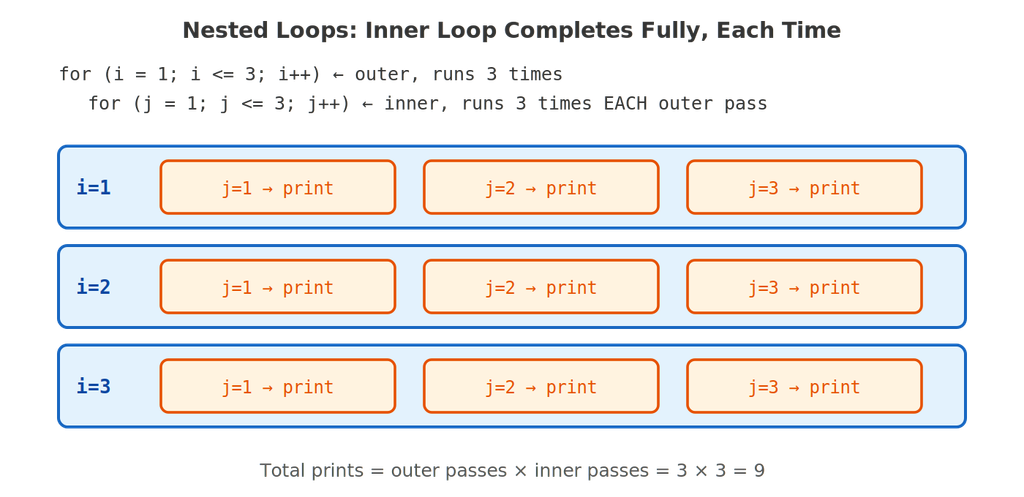
A for loop can contain another complete for loop — and the inner loop runs to completion, in full, every single time the outer loop advances by one step.
#include <stdio.h>

int main() {
    for (int i = 1; i <= 3; i++) {
        for (int j = 1; j <= 3; j++) {
            printf("i=%d, j=%d\n", i, j);
        }
    }

    return 0;
}
🖥️ Output:
i=1, j=1
i=1, j=2
i=1, j=3
i=2, j=1
…
i=3, j=3
Notice the total number of lines printed is 3 × 3 = 9 — the inner loop’s full 3 passes happen once for each of the outer loop’s 3 passes, exactly as diagrammed above.
Printing a Triangle Pattern
#include <stdio.h>

int main() {
    int rows = 5;

    for (int i = 1; i <= rows; i++) {
        for (int j = 1; j <= i; j++) {
            printf("*");
        }
        printf("\n");
    }

    return 0;
}
🖥️ Output:
*
**
***
****
*****
This is the classic pattern-printing exercise — the inner loop’s upper bound (j <= i) depends on the outer loop’s current value, so each row prints one more star than the row before it. Nested loops where the inner bound depends on the outer counter are extremely common once you move past simple grids.
🔧 Loop Variants Worth Knowing
Multiple Variables in One for Loop
#include <stdio.h>

int main() {
    for (int i = 1, j = 10; i <= 5; i++, j--) {
        printf("i=%d, j=%d\n", i, j);
    }

    return 0;
}
🖥️ Output:
i=1, j=10
i=2, j=9
i=3, j=8
i=4, j=7
i=5, j=6
The comma operator from the Bitwise and Special Operators post makes an appearance here — both i++, j-- in the update section and i = 1, j = 10 in the initialization use commas to run two statements where the loop header only expects one.
An Empty Body: All the Work Inside the Header
#include <stdio.h>

int main() {
    int sum = 0;
    int i;

    for (i = 1; i <= 100; sum += i, i++)
        ;   // empty body — everything already happened above

    printf("Sum: %d\n", sum);

    return 0;
}
🖥️ Output:
Sum: 5050
This works, but is included here as a curiosity, not a recommendation — cramming the real work into the loop header instead of the body makes code significantly harder to read. Prefer keeping the header limited to counting, and let the body do the actual work.
🚫 Common Mistakes Beginners Make
Mistake 1: The Off-By-One Error
#include <stdio.h>

int main() {
    for (int i = 1; i < 5; i++) {
        printf("%d ", i);
    }
    printf("\n");

    return 0;
}
🖥️ Output:
1 2 3 4
If the goal was to print 1 through 5, this is a bug — i < 5 stops the loop as soon as i reaches 5, one number short. This is called an off-by-one error, and it’s one of the most common loop bugs in any language. Double-check < versus <= against exactly what range you intend.
Mistake 2: The Stray Semicolon (Again)
#include <stdio.h>

int main() {
    int sum = 0;

    for (int i = 1; i <= 5; i++);   // <-- semicolon ends the loop here!
    {
        sum += i;
    }

    printf("Sum: %d\n", sum);

    return 0;
}
🖥️ Output (will not compile as written — i is out of scope below):
error: ‘i’ undeclared
Just like the same mistake with if in the previous post, a semicolon right after for(...) creates an empty loop body — the loop runs 5 times doing nothing at all, and the { sum += i; } block that follows is a completely separate, unconditional block that runs only once, after the loop has already finished.
Mistake 3: Forgetting to Update — the Infinite Loop
// DO NOT RUN — infinite loop, included for explanation only
#include <stdio.h>

int main() {
    for (int i = 1; i <= 5;) {   // no update step!
        printf("%d ", i);
    }

    return 0;
}
With no update expression, i never changes — it stays 1 forever, the condition i <= 5 is always true, and the loop never stops. Every part of the for header is technically optional in C, but leaving out the update is almost always an accident, not a real design choice.
| Mistake | Why it’s dangerous |
|---|---|
Off-by-one (< vs <=) | Loop runs one time too few or too many — easy to miss since the program still runs fine |
Semicolon right after for(...) | Creates an empty loop body with no compiler warning |
| Missing update expression | The condition never changes — the loop runs forever |
| Modifying the loop counter inside the body too | Changing i both in the body and the update step makes the loop’s true behavior very hard to predict |
🎓 Practice Exercises
Exercise 1: Predict the Output
for (int i = 5; i >= 1; i -= 2) {
    printf("%d ", i);
}
(Answer: 5 3 1 — starts at 5, decreases by 2 each time, stops once i >= 1 is false.)
Exercise 2: Fix the Off-By-One
Rewrite this loop so it correctly prints the numbers 1 through 10 (inclusive): for (int i = 1; i < 10; i++) { printf("%d ", i); }
(Answer: change i < 10 to i <= 10.)
Exercise 3: Build It Yourself
Write a nested for loop that prints a multiplication grid — rows 1 through 5, columns 1 through 5 — with each cell showing row × column, formatted so the columns line up (hint: revisit the field-width techniques from the Formatted Input and Output post).
❓ Frequently Asked Questions
Q: Can I leave any part of the for(…) header empty?
Yes — all three parts are optional, and for (;;) is valid C, creating a loop with no built-in stopping condition at all (an intentional infinite loop, usually paired with a break inside, which we’ll cover in a future post).
Q: What’s the difference between declaring int i inside for(…) versus before it?
Declaring it inside, as in for (int i = 1; ...), scopes i to the loop only — it doesn’t exist before or after. Declaring it beforehand, as in int i; for (i = 1; ...), lets you use i‘s final value after the loop ends, which the factorial and sum examples in this post rely on.
Q: Is a for loop ever the wrong choice?
Yes — when you don’t know in advance how many times you’ll need to repeat something (for example, “keep asking the user for input until they type ‘quit'”), a while loop is usually the more natural fit, since it’s built around a condition rather than a counter. We’ll cover it properly in an upcoming post.
✅ Key Takeaways
- A
forloop packs initialization, condition, and update into one line — the same three moving parts from the Algorithms post’s counter-based algorithms, just expressed as real C syntax. - The execution order is always: check condition → run body → run update → check condition again — repeating until the condition is false.
- Nested loops run the inner loop to full completion for every single pass of the outer loop — total iterations multiply, they don’t add.
- The three most dangerous mistakes — off-by-one errors, a stray semicolon, and a missing update step — all compile without warning and can silently break or infinitely loop a program.
- Every part of the header is technically optional, but a
forloop is at its clearest when initialization, condition, and update all relate directly to counting — save more creative uses for when they genuinely improve readability.
🚀 Next up: With definite repetition covered, we’ll look at indefinite repetition — the
whileanddo-whileloops — for situations where you don’t know in advance exactly how many times a loop needs to run.