Module I · Basics of C · Lecture 5
🎯 Why This Matters
You’ve already used printf() and scanf() throughout this course — but so far, only in their plainest form. Real programs rarely get to print numbers however they land: a receipt needs prices aligned in a neat column, a report needs exactly two decimal places, and a table of student records needs every row to line up regardless of how long each name is.
Formatted input and output is the set of tools C gives you to control exactly how a value is displayed or read — its width, its alignment, its number of decimal places, and more. This post covers every piece of that toolkit, with a runnable example for nearly every rule.
🔍 Anatomy of a Format Specifier
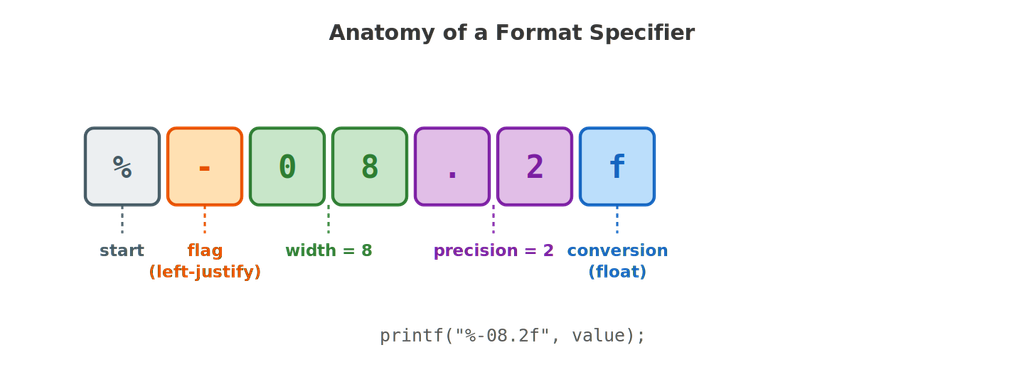
Every format specifier you’ve used so far — %d, %f, %c — is actually the simplest possible case of a much more flexible pattern. In full, a specifier can carry four optional pieces of information before the conversion character:
| Part | Purpose | Example |
|---|---|---|
| Flag | Alignment or sign display | - (left-justify), + (force a sign) |
| Width | Minimum number of characters to occupy | 10 in %10d |
| Precision | Decimal places (for floats) or max characters (for strings) | .2 in %.2f |
| Conversion | The data type being formatted | d, f, c, s |
💡 Key idea: Everything in this post is just filling in these four blanks differently. Once you can read %-08.2f as “left-justify, pad to 8 characters with zeros, show 2 decimal places, it’s a float” — you can read any format specifier you’ll ever encounter in C.
📏 Controlling Width
Adding a number directly after the % sets a minimum field width — if the value is shorter than that width, C pads it with spaces.
#include <stdio.h>

int main() {
    printf("[%d]\n", 42);
    printf("[%5d]\n", 42);
    printf("[%-5d]\n", 42);

    return 0;
}
🖥️ Output:
[42]
[ 42]
[42 ]
By default, C right-justifies within the given width — padding with spaces on the left. Adding a - flag flips this to left-justify instead, padding on the right. This single flag is the difference between numbers that line up neatly in a column and numbers that don’t.
Putting Width to Work: Aligning a Table
#include <stdio.h>

int main() {
    printf("%-10s%8s\n", "Name", "Marks");
    printf("%-10s%8d\n", "Anita", 88);
    printf("%-10s%8d\n", "Raj", 95);
    printf("%-10s%8d\n", "Fatima", 76);

    return 0;
}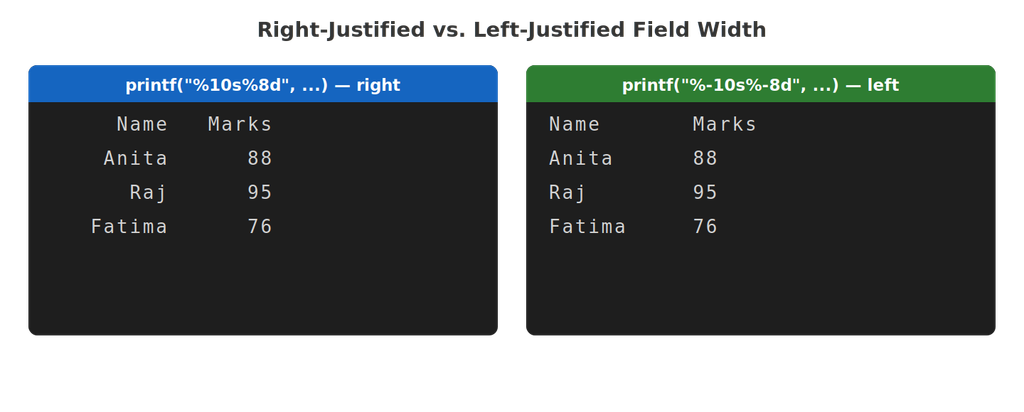
Notice the two columns use opposite flags on purpose: the name column is left-justified (%-10s) because names read naturally left-to-right, while the marks column is right-justified (%8d, no minus) because numbers are easiest to compare when their digits line up on the right — exactly how a calculator or spreadsheet displays them.
🎯 Controlling Precision
A precision — written as a period followed by a number — controls decimal places for floating-point numbers, or the maximum number of characters printed from a string.
#include <stdio.h>

int main() {
    float pi = 3.14159265;

    printf("Default:      %f\n", pi);
    printf("2 decimals:   %.2f\n", pi);
    printf("0 decimals:   %.0f\n", pi);
    printf("5 decimals:   %.5f\n", pi);

    return 0;
}
🖥️ Output:
Default: 3.141593
2 decimals: 3.14
0 decimals: 3
5 decimals: 3.14159
Notice that printf without any precision defaults to 6 decimal places — that’s why plain %f in earlier posts always printed six digits after the point, whether you wanted them or not.
#include <stdio.h>

int main() {
    char name[] = "Bhattacharya";

    printf("Full:         %s\n", name);
    printf("Max 4 chars:  %.4s\n", name);

    return 0;
}
🖥️ Output:
Full: Bhattacharya
Max 4 chars: Bhat
On a string, precision works completely differently than on a number — it truncates, cutting the text short at that many characters, rather than controlling decimal places.
Combining Width and Precision
#include <stdio.h>

int main() {
    float price = 9.5;

    printf("[%10.2f]\n", price);
    printf("[%-10.2f]\n", price);

    return 0;
}
🖥️ Output:
[ 9.50]
[9.50 ]
Width and precision are independent — width controls the overall box the value sits in, precision controls how the number itself is formatted inside that box.
🚩 The Other Flags: +, 0, and #
#include <stdio.h>

int main() {
    int score = 42;

    printf("Plain:        %d\n", score);
    printf("Force sign:   %+d\n", score);
    printf("Zero-padded:  %05d\n", score);

    return 0;
}
🖥️ Output:
Plain: 42
Force sign: +42
Zero-padded: 00042
| Flag | Effect |
|---|---|
- | Left-justify within the field width |
+ | Always show a sign, even for positive numbers |
0 | Pad with leading zeros instead of spaces (only makes sense with a width) |
💡 Where you’ll actually use %05d: Zero-padding is exactly how programs generate things like invoice numbers (00042) or timestamps (09:05) that always need a fixed number of digits, regardless of the value’s actual size.
⌨️ Formatted Input with scanf
Formatting matters for input too — not in the same visual sense as printf, but in how precisely you tell scanf what to expect and where to put it.
Refresher: Why & Is Required
#include <stdio.h>

int main() {
    int age;

    printf("Enter your age: ");
    scanf("%d", &age);
    printf("You entered: %d\n", age);

    return 0;
}
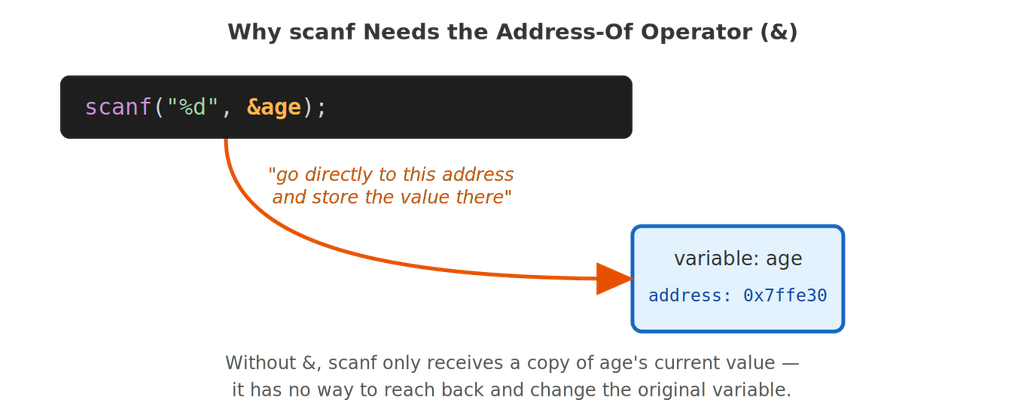
The & (address-of operator) hands scanf the exact memory location of age, rather than a copy of its value — which is the only way a function can reach back and modify a variable that belongs to main(). We’ll cover exactly how this works under the hood once we reach pointers later in this course.
Reading Multiple Values at Once
#include <stdio.h>

int main() {
    int day, month, year;

    printf("Enter date as DD MM YYYY: ");
    scanf("%d %d %d", &day, &month, &year);

    printf("You entered: %02d/%02d/%d\n", day, month, year);

    return 0;
}
🖥️ Sample run:
Enter date as DD MM YYYY: 5 8 2026
You entered: 05/08/2026
Notice %02d in the output — width 2 combined with the zero flag — is exactly what turns a single-digit day like 5 into the properly formatted 05 you’d expect on a calendar.
The Classic Trap: Leftover Newlines
This is the single most common formatted-input bug beginners run into. Consider a program that reads an age, then a grade:
#include <stdio.h>

int main() {
    int age;
    char grade;

    printf("Enter age: ");
    scanf("%d", &age);

    printf("Enter grade: ");
    scanf("%c", &grade);

    printf("Age: %d, Grade: %c\n", age, grade);

    return 0;
}
🖥️ Sample run (buggy):
Enter age: 25
Enter grade: Age: 25, Grade:
(the program never actually waited for the grade!)
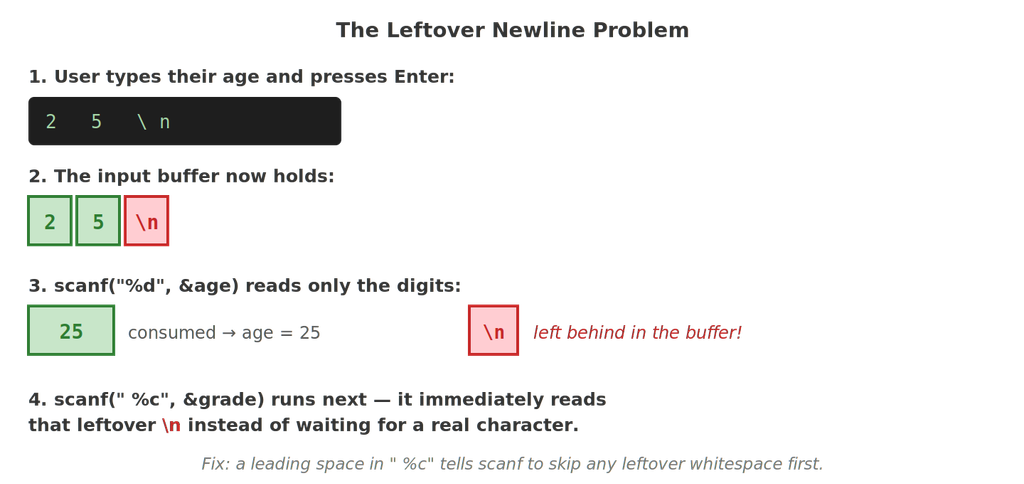
Here’s exactly what happens, step by step: when you type 25 and press Enter, the input buffer contains 2, 5, and the newline character produced by the Enter key. scanf("%d", ...) only consumes the digits 25 — it has no reason to touch the newline, since a newline isn’t part of a number. That leftover \n sits in the buffer, and the very next scanf("%c", ...) immediately reads that leftover newline as “the grade,” instead of waiting for you to type one.
The fix is a single leading space inside the format string:
scanf(" %c", &grade); // the leading space skips any leftover whitespace first💡 Why this works: A space in a scanf format string means “skip zero or more whitespace characters here” — including leftover newlines, tabs, and spaces from a previous read. %d, %f, and %u already skip leading whitespace automatically, which is exactly why this bug only shows up with %c.
🧑🎓 Full Walkthrough: A Formatted Student Record
Let’s put everything in this post together, matching this lecture’s activity: accept a student’s details and display them back in a neatly formatted layout.
#include <stdio.h>

int main() {
    char name[30];
    int rollNumber;
    float marks1, marks2, marks3;

    printf("Enter student name: ");
    scanf("%s", name);

    printf("Enter roll number: ");
    scanf("%d", &rollNumber);

    printf("Enter marks in 3 subjects: ");
    scanf("%f %f %f", &marks1, &marks2, &marks3);

    float total = marks1 + marks2 + marks3;
    float percentage = total / 3;

    printf("\n---------- STUDENT REPORT ----------\n");
    printf("%-15s: %s\n", "Name", name);
    printf("%-15s: %05d\n", "Roll Number", rollNumber);
    printf("%-15s: %6.2f\n", "Subject 1", marks1);
    printf("%-15s: %6.2f\n", "Subject 2", marks2);
    printf("%-15s: %6.2f\n", "Subject 3", marks3);
    printf("%-15s: %6.2f\n", "Total", total);
    printf("%-15s: %6.2f%%\n", "Percentage", percentage);
    printf("-------------------------------------\n");

    return 0;
}
🖥️ Sample run:
Enter student name: Priya
Enter roll number: 21
Enter marks in 3 subjects: 88 92.5 79
———- STUDENT REPORT ———-
Name : Priya
Roll Number : 00021
Subject 1 : 88.00
Subject 2 : 92.50
Subject 3 : 79.00
Total : 259.50
Percentage : 86.50%
————————————-
A few details worth calling out:
%-15skeeps every label left-justified in a 15-character-wide column, so every colon lines up in the same place regardless of label length.%05dforces the roll number into a consistent 5-digit format —21becomes00021, exactly like the invoice-number example earlier.%6.2fcombines width and precision together: 6 characters wide, always 2 decimal places, so every mark and total lines up neatly regardless of whether it’s79.00or92.50.%%is how you print a literal percent sign — since a lone%would otherwise be read as the start of a format specifier.
🚫 Common Mistakes Beginners Make
| Mistake | Why it happens |
|---|---|
Forgetting & before a variable in scanf | scanf receives a copy of the value instead of its memory address, so nothing gets stored |
A %c read immediately after a %d or %f read | The leftover newline from the previous input is consumed instead of waiting for new input |
Using %f to read into a double with scanf | Unlike printf, scanf requires %lf for double — the two are not interchangeable here |
| Assuming precision on a string rounds or pads | Precision on %s truncates the string; it never pads or rounds anything |
Printing a literal % as just % | A lone % is read as the start of a specifier — use %% instead |
🎓 Practice Exercises
Exercise 1: Predict the Output
printf("[%6.1f]\n", 3.14159);(Answer: [ 3.1] — one decimal place, right-justified to fill 6 characters total.)
Exercise 2: Fix the Bug
int day;
char initial;
scanf("%d", &day);
scanf("%c", &initial);
(Answer: change the second line to scanf(" %c", &initial); — the leading space skips the leftover newline left behind by the first scanf.)
Exercise 3: Build It Yourself
Write a program that reads a product name and price, then prints a receipt line with the name left-justified in a 20-character field and the price right-justified with a fixed $ width of 10 characters and 2 decimal places.
❓ Frequently Asked Questions
Q: Does width ever truncate a value that’s too long to fit?
No — width only ever specifies a minimum. If the value is longer than the width, C simply prints the full value and ignores the width entirely; only precision can truncate a string.
Q: Can I use a variable instead of a fixed number for width or precision?
Yes — using * in place of a number lets you pass the width or precision as an extra argument, e.g. printf("%*d", 10, 42); prints 42 right-justified in a field whose width is decided at runtime by the value 10.
Q: Why does %f default to 6 decimal places specifically?
It’s simply the historical default built into the C standard library — there’s no deeper reason beyond convention, which is exactly why explicitly writing .2f or whatever precision you actually need is considered good practice rather than relying on the default.
Q: Is the leftover newline problem specific to %c, or can it affect other specifiers too?
It’s specifically a %c issue, because %c reads the very next character with no skipping at all. %d, %f, and %s all automatically skip leading whitespace (including leftover newlines) before reading, which is why this bug never shows up between two numeric reads.
✅ Key Takeaways
- A format specifier can carry up to four parts: flag, width, precision, and conversion — every specifier you’ve used so far was just the simplest case of this pattern.
- Width sets a minimum field size and is right-justified by default; the
-flag switches it to left-justified. - Precision means decimal places for numbers but means “maximum characters” (truncation) for strings — the same syntax does two different jobs depending on the type.
scanfneeds&to reach a variable’s actual memory address — without it, nothing gets stored.- A
%cread immediately after a%d/%fread will consume a leftover newline instead of waiting for real input — fix it with a leading space:" %c". - Combining width, precision, and zero-padding (
%-15s,%05d,%6.2f) is exactly how real programs produce neatly aligned tables and reports.
🚀 Next up: With formatted input and output under your belt, we’ll move into operators and expressions — arithmetic, relational, and logical operators — and exactly how C decides the order in which a complex expression gets evaluated.