C Programming Series · Loop Control
🎯 Why This Matters
A normal loop is simple: check the condition, run the whole body, repeat until the condition becomes false. But real problems are not always that tidy. Sometimes you find what you were searching for halfway through and want to stop right away. Other times you meet one bad value and want to skip just that one and carry on.
C gives you two small keywords for exactly this:
break— stop the loop completely and jump to the code after it.continue— skip the rest of this pass and go on to the next pass.
💡 An easy way to remember: Imagine you are walking through a list of 10 rooms. continue means “this room is empty, skip it and go to the next room.” break means “I found what I was looking for, I’m leaving the building.”
1️⃣ break: Stop the Loop Right Now
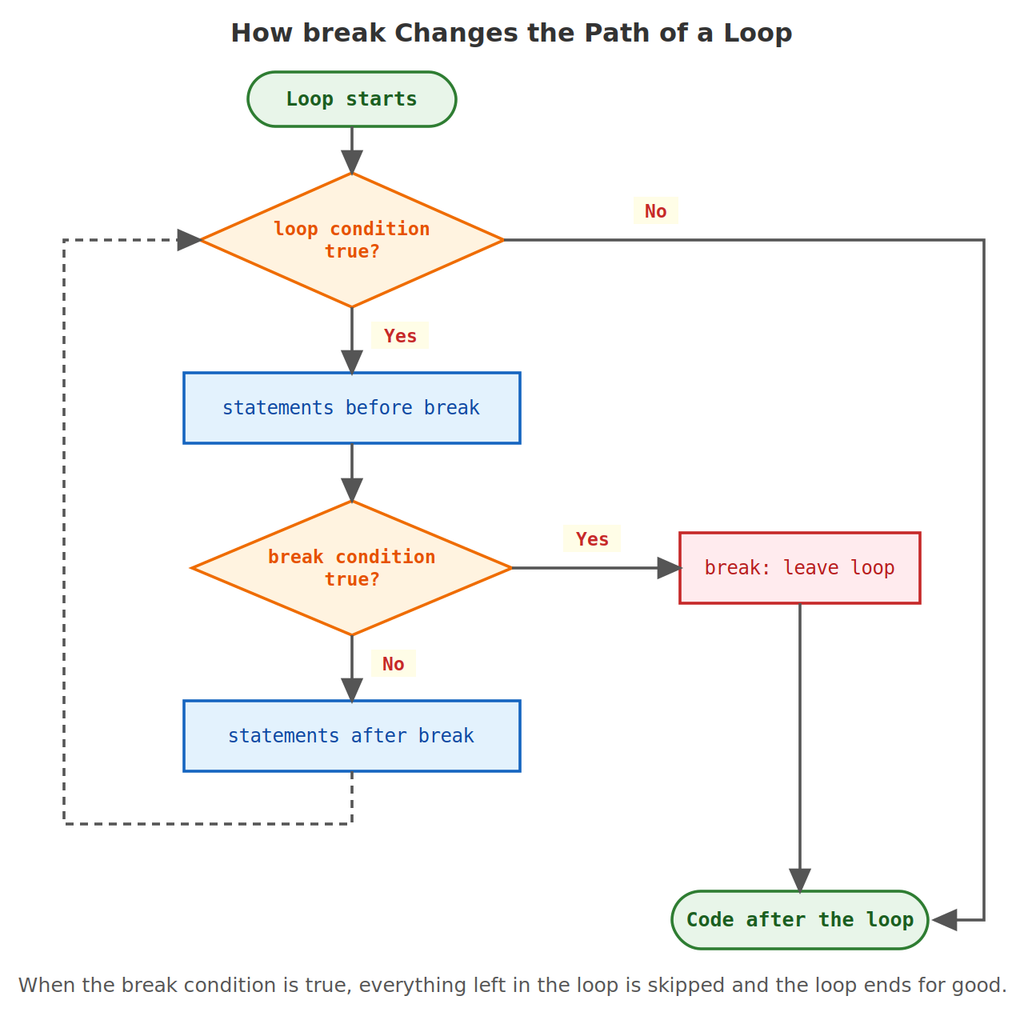
When C reaches break inside a loop, it immediately leaves that loop. Nothing else in the body runs, the condition is not checked again, and the program carries on with the first line after the loop. You almost always use it inside an if, so the loop only stops when something specific happens.
Example 1: The Simplest break
#include <stdio.h>int main() {
for (int i = 1; i <= 10; i++) {
if (i == 6) {
break;
}
printf("%d ", i);
}
printf("\nLoop ended early.\n"); return 0;}
🖥️ Output:
1 2 3 4 5
Loop ended early.
The loop was meant to go up to 10, but when i became 6, the break ended it. Notice 6 was never printed, because break happened before the printf line.
Example 2: Search and Stop
Here is the most common real use of break: look for something, and stop as soon as you find it. Let us find the first number between 1 and 100 that is divisible by both 7 and 9.
#include <stdio.h>int main() {
int found = 0; for (int n = 1; n <= 100; n++) { if (n % 7 == 0 && n % 9 == 0) { found = n; break; } } printf("First number divisible by both 7 and 9: %d\n", found); return 0;}
🖥️ Output:
First number divisible by both 7 and 9: 63
Without break, the loop would keep checking all the way to 100, even though we already have our answer at 63. With break, it stops at 63 and saves about 37 pointless checks. On a small example it hardly matters, but on big searches this saving is real.
Example 3: Is a Number Prime? (Stop at the First Divisor)
#include <stdio.h>int main() {
int n = 91;
int divisor = 0; for (int i = 2; i < n; i++) { if (n % i == 0) { divisor = i; break; } } if (divisor != 0) { printf("%d is NOT prime (first divisor found: %d)\n", n, divisor); } else { printf("%d is prime\n", n); } return 0;}
🖥️ Output:
91 is NOT prime (first divisor found: 7)
One divisor is enough to prove a number is not prime, so there is no reason to keep checking. The loop stops at i = 7 instead of checking every number up to 90. (Try n = 97: no divisor is ever found, so the loop runs to the end and the program prints that it is prime.)
Example 4: An “Endless” Loop That Ends With break
Sometimes you do not know how many times you will loop. A common pattern is while (1), which is a loop whose condition is always true, and use break as the only way out.
#include <stdio.h>int main() {
int num, sum = 0; printf("Enter numbers (0 to stop): "); while (1) { scanf("%d", &num); if (num == 0) { break; } sum += num; } printf("Sum = %d\n", sum); return 0;}
🖥️ Sample run:
Enter numbers (0 to stop): 10 20 30 0
Sum = 60
The condition 1 is always true, so on its own this loop would never stop. The break inside the if is the exit door. The value 0 here works as a “stop signal” — the same sentinel idea you saw in the while loop post.
Example 5: PIN With Three Attempts
#include <stdio.h>int main() {
int pin;
int granted = 0; for (int attempt = 1; attempt <= 3; attempt++) { printf("Attempt %d - enter PIN: ", attempt); scanf("%d", &pin); if (pin == 1234) { granted = 1; break; } printf("Wrong PIN.\n"); } if (granted) { printf("Access granted.\n"); } else { printf("Card blocked.\n"); } return 0;}
🖥️ Sample run:
Attempt 1 – enter PIN: 1111
Wrong PIN.
Attempt 2 – enter PIN: 2222
Wrong PIN.
Attempt 3 – enter PIN: 1234
Access granted.
The loop allows at most 3 tries, but a correct PIN ends it immediately with break, so a user who types the right PIN on the first try is never asked again. The variable granted remembers why the loop ended, so the code after the loop can tell success from failure.
Example 6: break Inside a switch Inside a Loop
You have already used break to end each case in a switch. Here is a trap: that break only leaves the switch, not the loop around it.
#include <stdio.h>int main() {
for (int i = 1; i <= 3; i++) {
switch (i) {
case 2:
printf("i is two\n");
break;
default:
printf("i is %d\n", i);
}
}
printf("Loop finished normally.\n"); return 0;}
🖥️ Output:
i is 1
i is two
i is 3
Loop finished normally.
When i is 2, the break ends the switch only. The loop carries on to i = 3. A break always belongs to the nearest loop or switch around it.
🪆 break in Nested Loops
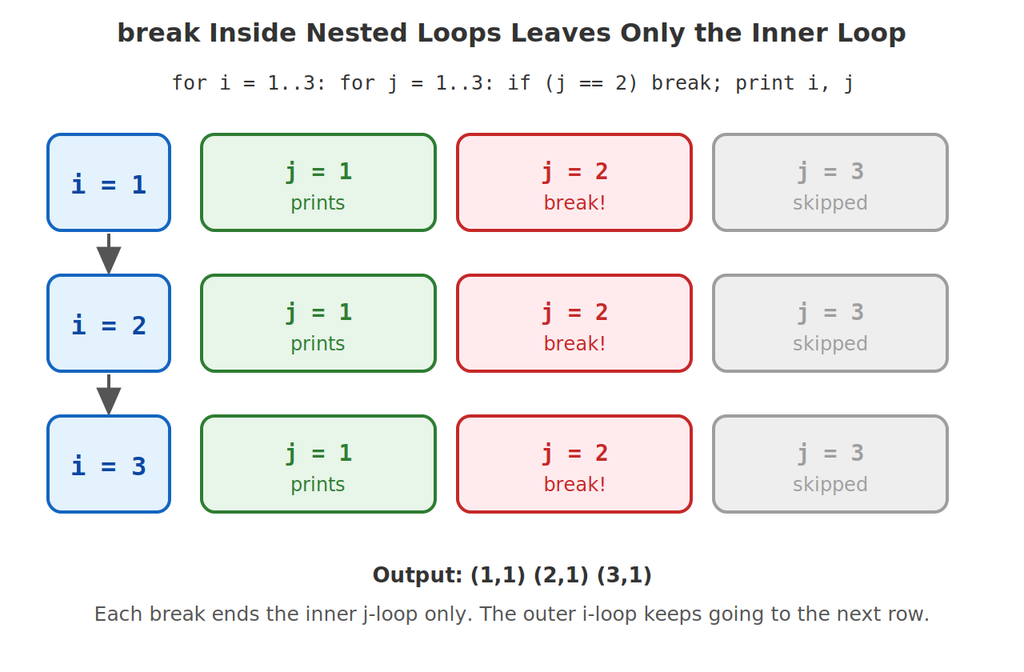
That same “nearest one” rule applies when you have a loop inside another loop: break leaves only the inner loop.
Example 7: break Leaves Only the Inner Loop
#include <stdio.h>int main() {
for (int i = 1; i <= 3; i++) {
for (int j = 1; j <= 3; j++) {
if (j == 2) {
break;
}
printf("i=%d j=%d\n", i, j);
}
} return 0;}
🖥️ Output:
i=1 j=1
i=2 j=1
i=3 j=1
Every time j reaches 2, the inner loop ends — but the outer loop is unaffected and happily moves on to the next i. That is why we still get one line for each of i = 1, 2, 3.
Example 8: Getting Out of Both Loops (the Flag Trick)
What if you want to stop both loops? Use a “flag” variable: set it before break, and make the outer loop check it too.
#include <stdio.h>int main() {
int done = 0; for (int i = 1; i <= 3 && !done; i++) { for (int j = 1; j <= 3; j++) { if (i * j == 4) { done = 1; break; } printf("%d x %d = %d\n", i, j, i * j); } } return 0;}
🖥️ Output:
1 x 1 = 1
1 x 2 = 2
1 x 3 = 3
2 x 1 = 2
When i * j becomes 4 (at i = 2, j = 2), the program sets done = 1 and breaks the inner loop. Back in the outer loop, the condition !done is now false, so the outer loop stops too. Both loops are finished.
2️⃣ continue: Skip This Pass Only
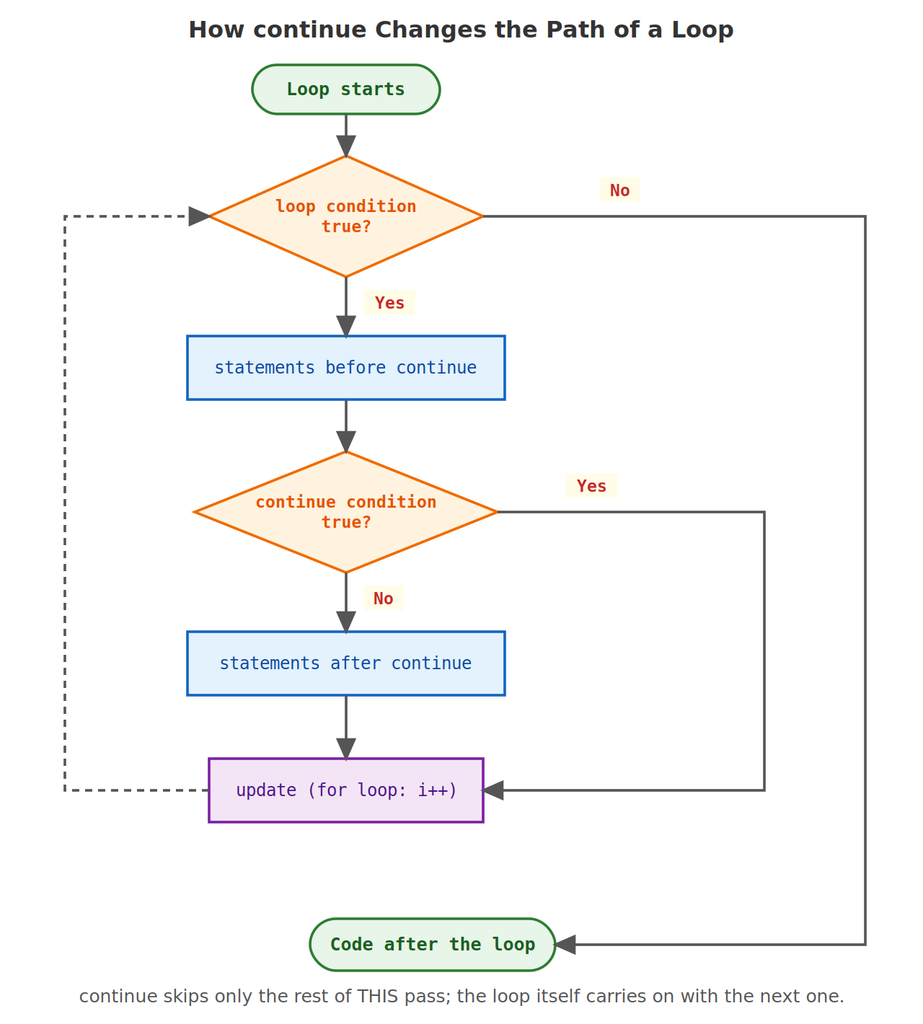
continue is gentler than break. It does not end the loop. It simply jumps over whatever is left in the current pass and moves on to the next one.
Example 9: Skip One Value
#include <stdio.h>int main() {
for (int i = 1; i <= 10; i++) {
if (i == 5) {
continue;
}
printf("%d ", i);
}
printf("\n"); return 0;}
🖥️ Output:
1 2 3 4 6 7 8 9 10
When i is 5, continue jumps over the printf, so 5 is missing from the output. The loop does not stop — it goes straight on to 6.
Example 10: Print Only Odd Numbers
#include <stdio.h>int main() {
for (int i = 1; i <= 10; i++) {
if (i % 2 == 0) {
continue;
}
printf("%d ", i);
}
printf("\n"); return 0;}
🖥️ Output:
1 3 5 7 9
“If the number is even, skip it” is a very natural way to think. The rest of the body only runs for numbers that passed the check.
Example 11: Add Numbers, Skipping Multiples of 3
#include <stdio.h>int main() {
int sum = 0; for (int i = 1; i <= 20; i++) { if (i % 3 == 0) { continue; } sum += i; } printf("Sum = %d\n", sum); return 0;}
🖥️ Output:
Sum = 147
The numbers 1 to 20 add up to 210. The multiples of 3 (3, 6, 9, 12, 15, 18) add up to 63. So skipping them gives 210 - 63 = 147. Here continue keeps the “ignore this one” rule separate from the real work, which is just sum += i.
Example 12: What Exactly Gets Skipped?
This example makes the behaviour very clear by printing a line at the start and at the end of every pass.
#include <stdio.h>int main() {
for (int i = 1; i <= 5; i++) {
printf("start %d\n", i);
if (i == 3) {
continue;
}
printf("end %d\n", i);
} return 0;}
🖥️ Output:
start 1
end 1
start 2
end 2
start 3
start 4
end 4
start 5
end 5
For i = 3 we see start 3 but no end 3: the lines after continue were skipped. But the loop did not end — the very next line is start 4.
Example 13: continue in a while Loop (Be Careful!)
In a for loop, continue still runs the update part (i++) before the next pass. A while loop has no such automatic update — continue jumps straight to the condition check. So you must make sure the counter has already been changed.
#include <stdio.h>int main() {
int i = 0; while (i < 10) { i++; // update FIRST if (i % 2 == 0) { continue; } printf("%d ", i); } printf("\n"); return 0;}
🖥️ Output:
1 3 5 7 9
Here i++ comes before the continue, so the counter always moves forward. Now look at what happens if you put the update at the bottom instead:
// DO NOT RUN: this is an infinite loop!
int i = 0;
while (i < 10) {
    if (i % 2 == 0) {
        continue;        // jumps back to the condition...
    }
    printf("%d ", i);
    i++;                 // ...so this line is never reached when i is even
}
Since i starts at 0 (even), continue jumps back to the condition. But i++ was skipped, so i is still 0 — and it will be 0 forever. The program never ends.
Example 14: Skip Invalid Input
#include <stdio.h>int main() {
int mark, valid = 0, total = 0; for (int i = 1; i <= 5; i++) { printf("Enter mark %d: ", i); scanf("%d", &mark); if (mark < 0 || mark > 100) { printf("Invalid, skipped.\n"); continue; } total += mark; valid++; } printf("Valid entries: %d, total = %d\n", valid, total); return 0;}
🖥️ Sample run:
Enter mark 1: 80
Enter mark 2: -5
Invalid, skipped.
Enter mark 3: 90
Enter mark 4: 150
Invalid, skipped.
Enter mark 5: 70
Valid entries: 3, total = 240
A great use of continue: handle the bad case in a few lines, then skip straight to the next input. Only the valid marks reach the total += mark line.
Where Does continue Jump To?
| Loop type | After continue, C jumps to… |
|---|---|
for | the update step (i++), then the condition |
while | the condition check directly |
do-while | the condition check at the bottom |
3️⃣ Using break and continue Together
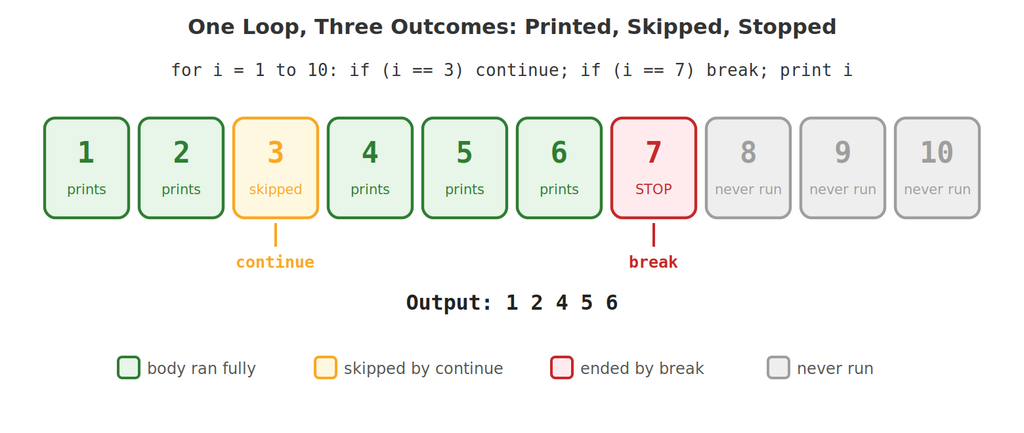
The two keywords often appear in the same loop. Here is one loop showing all three possible fates of an iteration: it can run normally, be skipped by continue, or be ended by break.
Example 15: Skip Negatives, Stop at Zero
#include <stdio.h>int main() {
int num, sum = 0, count = 0; printf("Enter numbers (0 to stop): "); while (1) { scanf("%d", &num); if (num == 0) { break; } if (num < 0) { continue; } sum += num; count++; } printf("Added %d positive numbers, sum = %d\n", count, sum); return 0;}
🖥️ Sample run:
Enter numbers (0 to stop): 5 -3 10 -1 20 0
Added 3 positive numbers, sum = 35
Each number goes through two checks. Zero means “we’re done” (break). A negative number means “ignore this one and read the next” (continue). Anything else is added. So 5 + 10 + 20 = 35, with -3 and -1 quietly skipped.
📊 break vs. continue at a Glance
break | continue | |
|---|---|---|
| What it does | Ends the loop completely | Ends only the current pass |
| What runs next | The first line after the loop | The next pass of the same loop (after the update/condition check) |
| Typical use | “I found it, stop searching” | “This value is not wanted, skip it” |
| Can be used in | Loops and switch | Loops only |
| Loop count afterwards | Fewer passes than planned | Same number of passes, some cut short |
🚫 Common Mistakes Beginners Make
| Mistake | What really happens |
|---|---|
Expecting break to exit all nested loops | It leaves only the innermost loop (use a flag, as in Example 8) |
Using continue in a while loop before the counter is updated | The counter never changes, so the loop runs forever |
Thinking break inside a switch inside a loop stops the loop | It only ends the switch |
Writing break or continue outside any loop (or switch) | The compiler reports an error |
Forgetting braces after the if | Only the first statement belongs to the if (see below) |
Example 16: The Missing-Braces Trap
#include <stdio.h>int main() {
for (int i = 1; i <= 5; i++) {
if (i == 3)
printf("Skipping 3\n");
continue; // NOT part of the if!
printf("%d\n", i);
} return 0;}
🖥️ Output:
Skipping 3
We wanted to skip only 3, but continue is not inside the if — without braces, only the one printf line belongs to it. So continue runs on every pass, and the final printf is never reached. Always use { } when the if controls break or continue.
🎓 Practice Exercises
Exercise 1: Predict the Output
for (int i = 1; i <= 5; i++) {
    if (i == 3) {
        break;
    }
    printf("%d ", i);
}
(Answer: 1 2 — the loop ends as soon as i is 3.)
Exercise 2: Predict the Output
for (int i = 1; i <= 5; i++) {
    if (i == 3) {
        continue;
    }
    printf("%d ", i);
}
(Answer: 1 2 4 5 — only the pass where i is 3 is skipped.)
Exercise 3: Nested continue
for (int i = 1; i <= 3; i++) {
    for (int j = 1; j <= 3; j++) {
        if (j == i) {
            continue;
        }
        printf("%d%d ", i, j);
    }
}
(Answer: 12 13 21 23 31 32 — every pair is printed except the ones where j equals i.)
Exercise 4: Find the Bug
int n = 1;
while (n <= 10) {
    if (n % 5 == 0) {
        continue;
    }
    printf("%d ", n);
    n++;
}
(Answer: when n reaches 5, continue jumps back to the condition without running n++, so n stays 5 forever — an infinite loop. Fix: move n++ above the if, or use a for loop.)
Exercise 5: Build It Yourself
Write a program that prints the numbers from 1 to 20, but skips every multiple of 4, and stops completely when it reaches 15. (Expected output: 1 2 3 5 6 7 9 10 11 13 14.)
❓ Frequently Asked Questions
Q: Can I use break outside of a loop?
Only inside a loop or a switch. Anywhere else, the compiler gives an error like “break statement not within loop or switch”. The same is true for continue, which is allowed only inside loops.
Q: Does break inside an if statement stop just the if?
No. An if is not a loop, so break ignores it and ends the nearest loop (or switch) around it. That is exactly how Examples 1 to 5 work.
Q: Is it bad style to use break and continue?
Not at all, when used sensibly. They often make code simpler, as in the search and skip-invalid-input examples. The only caution is overuse: a loop with many break and continue statements scattered inside can become hard to follow, and it may be a sign the logic could be written more clearly.
Q: Can I use break to leave a loop that has no condition, like for (;;)?
Yes. A loop with no condition runs forever by itself, so break is the normal way to end it — just like the while (1) in Examples 4 and 15.
✅ Key Takeaways
breakends the loop completely and jumps to the code after it — perfect for “I found it, stop searching”.continueskips only the rest of the current pass and moves on to the next one — perfect for “skip this value”.- A
breakalways belongs to the nearest loop orswitch, so in nested loops it leaves only the inner loop (use a flag to leave both). - In a
forloop,continuestill runs the update step; in awhileloop it jumps straight to the condition — so update your counter beforecontinueor the loop may never end. - Always put braces around the
ifthat controlsbreakorcontinue, so the keyword is really inside it.
🚀 Next up: We will look at functions — how to split a program into small, named pieces that you can write once and use again and again, and how that changes the way variables are shared between different parts of your program.