Module I · Arrays · Lecture 20
🎯 Why This Matters
Suppose you want to store the marks of 5 students. With what you know so far, you would write five separate variables: mark1, mark2, mark3, mark4, mark5. Now imagine 500 students. That would be impossible to manage.
An array solves this. It lets you store many values of the same type under one name, side by side in memory, and reach each one with a number called an index. Almost every real program uses arrays: lists of marks, prices, temperatures, names. In this post we will learn how to declare and fill an array, how C finds each element in memory, and how to do the three classic operations: traversal, insertion and deletion.
1️⃣ Declaring an Array
An array declaration has three parts: the type of every element, the name, and the size in square brackets.
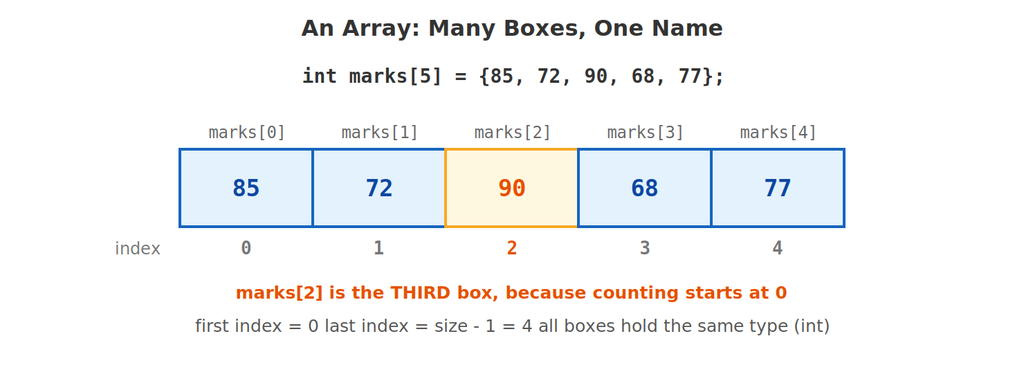
int marks[5];This creates 5 int boxes in a row, named marks. The size must be a fixed number that is known when you write the program. Each box is reached with its index, and the first index is 0, not 1. So an array of size 5 has indexes 0, 1, 2, 3, 4.
Example 1: Putting Values In and Reading Them Out
#include <stdio.h>

int main() {
    int marks[5];

    marks[0] = 85;
    marks[1] = 72;
    marks[2] = 90;
    marks[3] = 68;
    marks[4] = 77;

    printf("First mark: %d\n", marks[0]);
    printf("Third mark: %d\n", marks[2]);
    printf("Last mark: %d\n", marks[4]);

    return 0;
}
🖥️ Output:
First mark: 85
Third mark: 90
Last mark: 77
marks[2] is the third box because counting starts at 0. A handy rule: for an array of size n, the last valid index is always n - 1.
2️⃣ Initializing an Array
Instead of assigning one element at a time, you can fill the whole array when you declare it, using curly braces.
Example 2: Four Ways to Initialize
#include <stdio.h>

int main() {
    int a[5] = {10, 20, 30, 40, 50};   // every value given
    int b[5] = {1, 2};                 // the rest become 0
    int c[] = {7, 8, 9};               // size is worked out: 3
    int d[5] = {0};                    // all five become 0

    int cn = sizeof(c) / sizeof(c[0]); // number of elements in c

    printf("a: ");
    for (int i = 0; i < 5; i++) {
        printf("%d ", a[i]);
    }
    printf("\nb: ");
    for (int i = 0; i < 5; i++) {
        printf("%d ", b[i]);
    }
    printf("\nc: ");
    for (int i = 0; i < cn; i++) {
        printf("%d ", c[i]);
    }
    printf("\nd: ");
    for (int i = 0; i < 5; i++) {
        printf("%d ", d[i]);
    }
    printf("\n");

    return 0;
}
🖥️ Output:
a: 10 20 30 40 50
b: 1 2 0 0 0
c: 7 8 9
d: 0 0 0 0 0
| Form | What you get |
|---|---|
int a[5] = {10, 20, 30, 40, 50}; | Every element set exactly as written |
int b[5] = {1, 2}; | First two set; all the remaining elements become 0 |
int c[] = {7, 8, 9}; | C counts the values and makes the size 3 for you |
int d[5] = {0}; | A quick way to set every element to 0 |
int e[5]; (no values) | Elements hold garbage — random leftover values. Never read them before storing something |
⚠️ Garbage values: An array declared without initial values (like int e[5]; inside main()) contains unpredictable numbers left in memory. Always give your array values before you use it.
3️⃣ Traversal: Visiting Every Element
Traversal means going through the array from the first element to the last. A for loop with the index as the counter is the natural tool: i goes from 0 up to n - 1.
Example 3: Finding the Length and Printing Everything
#include <stdio.h>

int main() {
    int arr[] = {4, 8, 15, 16, 23, 42};
    int n = sizeof(arr) / sizeof(arr[0]);

    printf("Number of elements: %d\n", n);

    for (int i = 0; i < n; i++) {
        printf("arr[%d] = %d\n", i, arr[i]);
    }

    return 0;
}
🖥️ Output:
Number of elements: 6
arr[0] = 4
arr[1] = 8
arr[2] = 15
arr[3] = 16
arr[4] = 23
arr[5] = 42
The line sizeof(arr) / sizeof(arr[0]) is the standard way to count elements: sizeof(arr) is the total bytes in the whole array, and sizeof(arr[0]) is the bytes in one element. Dividing gives the count (here 24 / 4 = 6). Notice the loop condition is i < n, not i <= n. Using <= would try to read arr[6], which does not exist.
Example 4: Reading Values From the User
#include <stdio.h>

int main() {
    int nums[5];

    for (int i = 0; i < 5; i++) {
        printf("Enter number %d: ", i + 1);
        scanf("%d", &nums[i]);
    }

    printf("In reverse order: ");
    for (int i = 4; i >= 0; i--) {
        printf("%d ", nums[i]);
    }
    printf("\n");

    return 0;
}
🖥️ Sample run:
Enter number 1: 3
Enter number 2: 7
Enter number 3: 1
Enter number 4: 9
Enter number 5: 4
In reverse order: 4 9 1 7 3
Two things to notice. First, &nums[i] gives scanf the address of box number i, so each typed value lands in its own element. Second, traversal does not always go forwards: the second loop starts at the last index 4 and counts down to 0.
Example 5: Sum, Average, Largest and Smallest
#include <stdio.h>

int main() {
    int arr[] = {45, 82, 67, 91, 58};
    int n = sizeof(arr) / sizeof(arr[0]);
    int sum = 0, max = arr[0], min = arr[0];

    for (int i = 0; i < n; i++) {
        sum += arr[i];
        if (arr[i] > max) {
            max = arr[i];
        }
        if (arr[i] < min) {
            min = arr[i];
        }
    }

    printf("Sum = %d\n", sum);
    printf("Average = %.1f\n", (float) sum / n);
    printf("Largest = %d\n", max);
    printf("Smallest = %d\n", min);

    return 0;
}
🖥️ Output:
Sum = 343
Average = 68.6
Largest = 91
Smallest = 45
We start max and min with the first element, then let each later element challenge them. The cast (float) sum makes the division give decimals, the same trick from the Data Types post.
🧭 Address Calculation: How C Finds an Element
An array is stored as one continuous block of memory, with the elements right next to each other. The address of the first element is called the base address. To find any other element, C does a simple calculation:
address of arr[i] = base address + i × (size of one element)
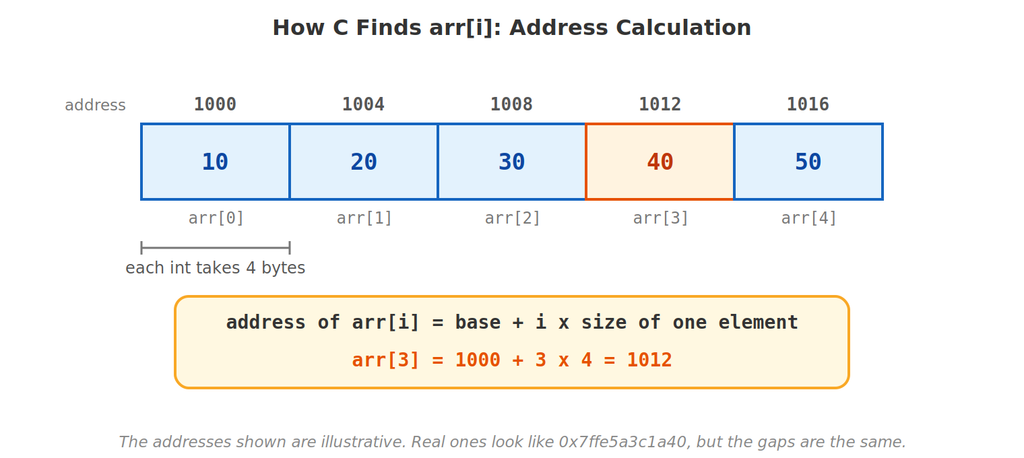
This is also the real reason indexing starts at 0: the index is just “how many elements to skip from the start”. arr[0] skips none, so it sits exactly at the base address.
Example 6: Printing Real Addresses
#include <stdio.h>

int main() {
    int arr[5] = {10, 20, 30, 40, 50};

    for (int i = 0; i < 5; i++) {
        printf("arr[%d] is at %p\n", i, (void *)&arr[i]);
    }

    return 0;
}
🖥️ Sample output (your addresses will be different):
arr[0] is at 0x7ffd3c2a1a30
arr[1] is at 0x7ffd3c2a1a34
arr[2] is at 0x7ffd3c2a1a38
arr[3] is at 0x7ffd3c2a1a3c
arr[4] is at 0x7ffd3c2a1a40
The addresses are in hexadecimal and will differ on every computer. What matters is the gap: each address is exactly 4 bytes after the previous one (30 → 34 → 38 → 3c → 40 in hex), because each int takes 4 bytes. The format of %p can look slightly different on other systems.
Example 7: The Gap Depends on the Type
#include <stdio.h>

int main() {
    int ia[3] = {1, 2, 3};
    double da[3] = {1.5, 2.5, 3.5};
    char ca[3] = {'a', 'b', 'c'};

    printf("int array:    arr[1] - arr[0] = %lu byte(s)\n",
           (unsigned long)&ia[1] - (unsigned long)&ia[0]);
    printf("double array: arr[1] - arr[0] = %lu byte(s)\n",
           (unsigned long)&da[1] - (unsigned long)&da[0]);
    printf("char array:   arr[1] - arr[0] = %lu byte(s)\n",
           (unsigned long)&ca[1] - (unsigned long)&ca[0]);

    return 0;
}
🖥️ Output:
int array: arr[1] – arr[0] = 4 byte(s)
double array: arr[1] – arr[0] = 8 byte(s)
char array: arr[1] – arr[0] = 1 byte(s)
The “size of one element” in the formula changes with the type: 4 for int, 8 for double, 1 for char. (These sizes match the Data Types post. Here we turned the addresses into plain numbers just to subtract them and measure the gap.)
🔧 Basic Operations
Example 8: Changing Every Element
#include <stdio.h>

int main() {
    int arr[5] = {1, 2, 3, 4, 5};

    printf("Before: ");
    for (int i = 0; i < 5; i++) {
        printf("%d ", arr[i]);
    }

    for (int i = 0; i < 5; i++) {
        arr[i] = arr[i] * 2;
    }

    printf("\nAfter doubling: ");
    for (int i = 0; i < 5; i++) {
        printf("%d ", arr[i]);
    }
    printf("\n");

    return 0;
}
🖥️ Output:
Before: 1 2 3 4 5
After doubling: 2 4 6 8 10
An array element is a normal variable, so arr[i] = arr[i] * 2; reads the old value, doubles it, and stores it back in the same box.
Example 9: Searching for a Value
#include <stdio.h>

int main() {
    int arr[] = {4, 8, 15, 16, 23, 42};
    int n = sizeof(arr) / sizeof(arr[0]);
    int target = 23, index = -1;

    for (int i = 0; i < n; i++) {
        if (arr[i] == target) {
            index = i;
            break;
        }
    }

    if (index != -1) {
        printf("%d found at index %d\n", target, index);
    } else {
        printf("%d not found\n", target);
    }

    return 0;
}
🖥️ Output:
23 found at index 4
This is a linear search: check the elements one by one, and use break (from the previous post) to stop as soon as the value is found. The variable index starts at -1, which can never be a real index, so after the loop it tells us whether we found anything.
Example 10: Copying an Array
#include <stdio.h>

int main() {
    int src[5] = {1, 2, 3, 4, 5};
    int dest[5];

    // dest = src;   // ERROR: you cannot assign a whole array with =

    for (int i = 0; i < 5; i++) {
        dest[i] = src[i];
    }

    printf("Copied array: ");
    for (int i = 0; i < 5; i++) {
        printf("%d ", dest[i]);
    }
    printf("\n");

    return 0;
}
🖥️ Output:
Copied array: 1 2 3 4 5
C does not allow dest = src; for arrays. To copy one array into another, copy the elements one at a time with a loop.
➕ Insertion: Adding an Element in the Middle
An array has a fixed size, so we cannot really “grow” it. Instead we declare it a bit bigger than we need, and keep a separate variable n that remembers how many slots are actually in use.
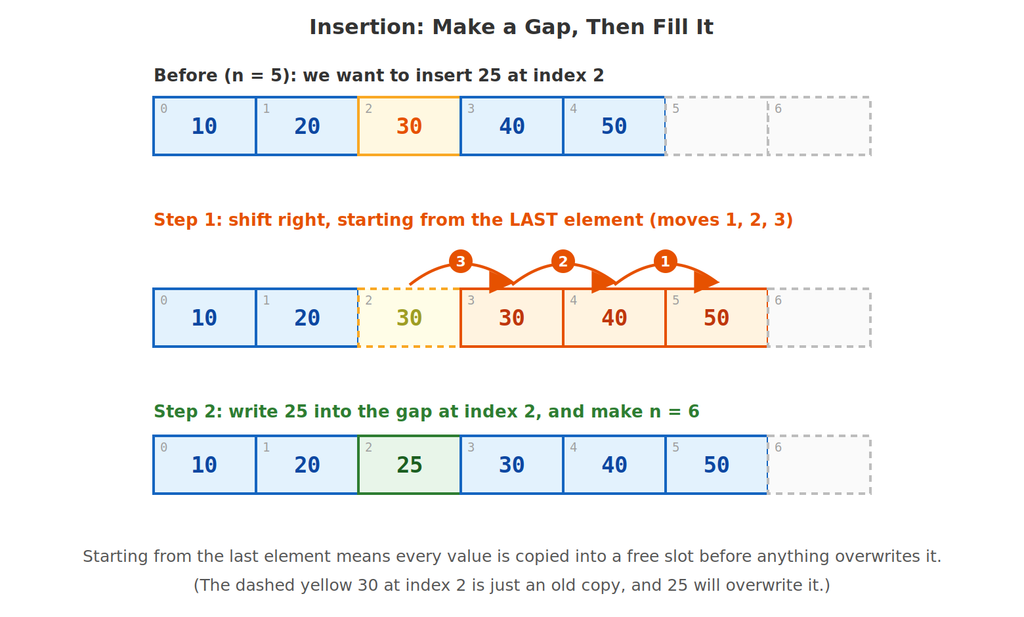
To insert a value at position pos, the elements from pos onwards must each move one place to the right to open a gap. Then we write the new value into the gap and increase n.
Example 11: Insert 25 at Index 2
#include <stdio.h>

int main() {
    int arr[10] = {10, 20, 30, 40, 50};   // room for 10, using 5
    int n = 5;
    int pos = 2, value = 25;

    printf("Before: ");
    for (int i = 0; i < n; i++) {
        printf("%d ", arr[i]);
    }

    for (int i = n - 1; i >= pos; i--) {   // shift right, LAST element first
        arr[i + 1] = arr[i];
    }
    arr[pos] = value;
    n++;

    printf("\nAfter insertion: ");
    for (int i = 0; i < n; i++) {
        printf("%d ", arr[i]);
    }
    printf("\n");

    return 0;
}
🖥️ Output:
Before: 10 20 30 40 50
After insertion: 10 20 25 30 40 50
Study the shifting loop: it starts at the last element (i = n - 1) and walks backwards to pos. Each pass copies arr[i] into arr[i + 1], moving one value into a free slot. After the loop, index 2 is free to overwrite, so arr[pos] = value; places the 25. Finally n++ records that the array now holds one more element.
Example 12: A Safer Insertion That Checks the Input
#include <stdio.h>

int main() {
    int arr[10] = {10, 20, 30, 40, 50};
    int n = 5, pos, value;

    printf("Enter position (0 to %d) and value: ", n);
    scanf("%d %d", &pos, &value);

    if (n == 10) {
        printf("Array is full.\n");
    } else if (pos < 0 || pos > n) {
        printf("Invalid position.\n");
    } else {
        for (int i = n - 1; i >= pos; i--) {
            arr[i + 1] = arr[i];
        }
        arr[pos] = value;
        n++;

        printf("Array: ");
        for (int i = 0; i < n; i++) {
            printf("%d ", arr[i]);
        }
        printf("\n");
    }

    return 0;
}
🖥️ Sample run 1:
Enter position (0 to 5) and value: 3 99
Array: 10 20 30 99 40 50
Sample run 2:
Enter position (0 to 5) and value: 9 1
Invalid position.
Before inserting we check two things: the array must not already be full (n == 10), and the position must be between 0 and n. Position n itself is allowed, because it simply means “add at the end”.
Example 13: The Classic Bug (Shifting the Wrong Way)
What if we shift from the front instead of the back? Let us see exactly what goes wrong.
#include <stdio.h>

int main() {
    int arr[10] = {10, 20, 30, 40, 50};
    int n = 5, pos = 2, value = 25;

    for (int i = pos; i < n; i++) {      // WRONG direction
        arr[i + 1] = arr[i];
    }
    arr[pos] = value;
    n++;

    printf("Wrong result: ");
    for (int i = 0; i < n; i++) {
        printf("%d ", arr[i]);
    }
    printf("\n");

    return 0;
}
🖥️ Output:
Wrong result: 10 20 25 30 30 30
The 40 and 50 have vanished! Going forwards, arr[3] = arr[2] copies 30 over the 40 before the 40 could be moved. Then arr[4] = arr[3] copies that same 30 again, and so on. Every value gets overwritten by its neighbour. That is why insertion must always shift starting from the last element.
➖ Deletion: Removing an Element
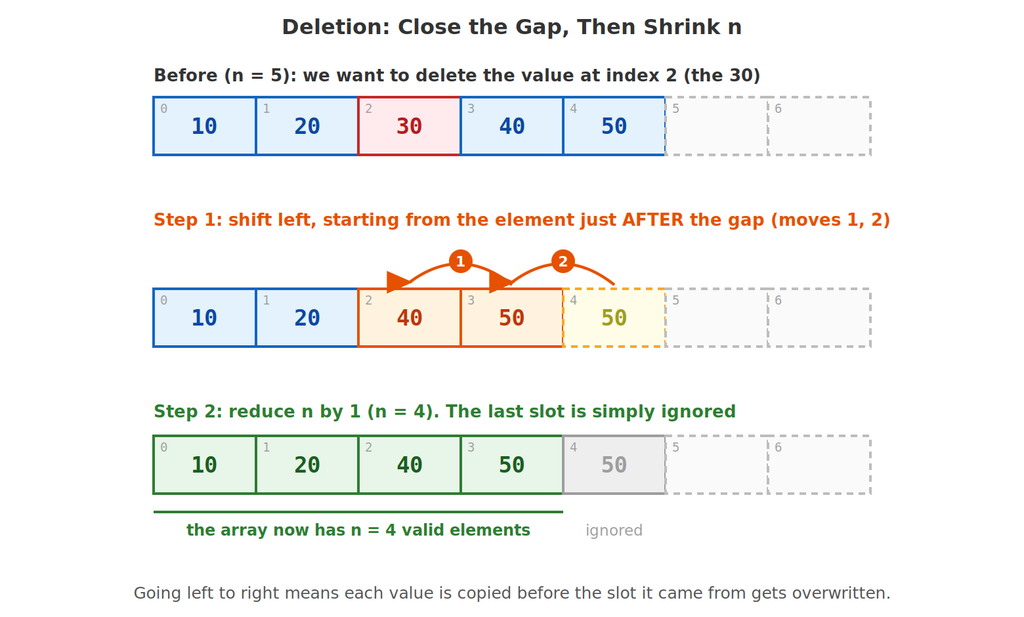
Deletion is the mirror image. To delete the element at pos, every element after it moves one place to the left, covering the gap. Then we reduce n by 1. The leftover copy at the end is not erased; it is simply ignored because it is beyond n.
Example 14: Delete the Element at Index 2
#include <stdio.h>

int main() {
    int arr[10] = {10, 20, 30, 40, 50};
    int n = 5;
    int pos = 2;

    printf("Before: ");
    for (int i = 0; i < n; i++) {
        printf("%d ", arr[i]);
    }

    for (int i = pos; i < n - 1; i++) {   // shift left, FIRST element first
        arr[i] = arr[i + 1];
    }
    n--;

    printf("\nAfter deletion: ");
    for (int i = 0; i < n; i++) {
        printf("%d ", arr[i]);
    }
    printf("\n");

    return 0;
}
🖥️ Output:
Before: 10 20 30 40 50
After deletion: 10 20 40 50
This time the loop goes forwards from pos, copying each element from its right neighbour: arr[2] = arr[3], then arr[3] = arr[4]. It stops at n - 1 because arr[i + 1] must still be a valid element. Then n-- shrinks the array by one.
Example 15: Delete by Value (Search, Then Shift)
#include <stdio.h>

int main() {
    int arr[10] = {10, 20, 30, 40, 50};
    int n = 5;
    int target = 40, pos = -1;

    for (int i = 0; i < n; i++) {
        if (arr[i] == target) {
            pos = i;
            break;
        }
    }

    if (pos == -1) {
        printf("%d not found\n", target);
    } else {
        for (int i = pos; i < n - 1; i++) {
            arr[i] = arr[i + 1];
        }
        n--;

        printf("Deleted %d from index %d\n", target, pos);
        printf("Array: ");
        for (int i = 0; i < n; i++) {
            printf("%d ", arr[i]);
        }
        printf("\n");
    }

    return 0;
}
🖥️ Output:
Deleted 40 from index 3
Array: 10 20 30 50
This combines two skills you already have: the linear search from Example 9 to find the position, and the left-shift from Example 14 to remove it. If the value is not in the array, we print a message and leave the array alone.
🧑🎓 Putting It All Together: A Menu-Driven Array Manager
Now let us combine insertion, deletion and traversal into one small program with a menu, using a do-while loop and a switch, exactly the way menu programs are usually written. Look closely at the break statements inside the if blocks: they leave the nearest switch, which is what we want here.
Example 16: Array Manager
#include <stdio.h>

int main() {
    int arr[10];
    int n = 0;
    int choice, pos, value;

    do {
        printf("\n1. Insert  2. Delete  3. Display  4. Exit\n");
        printf("Enter choice: ");
        scanf("%d", &choice);

        switch (choice) {
            case 1:
                if (n == 10) {
                    printf("Array is full.\n");
                    break;
                }
                printf("Enter position (0 to %d) and value: ", n);
                scanf("%d %d", &pos, &value);
                if (pos < 0 || pos > n) {
                    printf("Invalid position.\n");
                    break;
                }
                for (int i = n - 1; i >= pos; i--) {
                    arr[i + 1] = arr[i];
                }
                arr[pos] = value;
                n++;
                printf("Inserted %d at position %d.\n", value, pos);
                break;

            case 2:
                if (n == 0) {
                    printf("Array is empty.\n");
                    break;
                }
                printf("Enter position to delete (0 to %d): ", n - 1);
                scanf("%d", &pos);
                if (pos < 0 || pos >= n) {
                    printf("Invalid position.\n");
                    break;
                }
                printf("Deleted %d.\n", arr[pos]);
                for (int i = pos; i < n - 1; i++) {
                    arr[i] = arr[i + 1];
                }
                n--;
                break;

            case 3:
                if (n == 0) {
                    printf("Array is empty.\n");
                } else {
                    printf("Array: ");
                    for (int i = 0; i < n; i++) {
                        printf("%d ", arr[i]);
                    }
                    printf("\n");
                }
                break;

            case 4:
                printf("Goodbye!\n");
                break;

            default:
                printf("Invalid choice.\n");
        }
    } while (choice != 4);

    return 0;
}
🖥️ Sample run:
1. Insert 2. Delete 3. Display 4. Exit
Enter choice: 1
Enter position (0 to 0) and value: 0 10
Inserted 10 at position 0.
1. Insert 2. Delete 3. Display 4. Exit
Enter choice: 1
Enter position (0 to 1) and value: 1 20
Inserted 20 at position 1.
1. Insert 2. Delete 3. Display 4. Exit
Enter choice: 3
Array: 10 20
1. Insert 2. Delete 3. Display 4. Exit
Enter choice: 2
Enter position to delete (0 to 1): 0
Deleted 10.
1. Insert 2. Delete 3. Display 4. Exit
Enter choice: 3
Array: 20
1. Insert 2. Delete 3. Display 4. Exit
Enter choice: 4
Goodbye!
The array starts empty (n = 0). Every operation uses only the tools from this post: the right-shift to insert, the left-shift to delete, and a traversal loop to display. Because the checks (n == 10, n == 0, bad positions) come first, the program never reads or writes outside the array.
🚫 Common Mistakes Beginners Make
| Mistake | What really happens |
|---|---|
Using index n instead of n - 1 as the last element | An array of size 5 has indexes 0 to 4. arr[5] does not exist |
Writing the loop as i <= n | The loop runs one time too many and touches memory outside the array |
Forgetting to change n after inserting or deleting | The array and your count disagree, so you print too few or too many values |
| Shifting in the wrong direction | Values get overwritten before they are moved (see Example 13) |
| Using an array before giving it values | It holds garbage values |
Trying arr2 = arr1; | Not allowed; copy element by element with a loop |
The Most Dangerous One: Going Outside the Array
// DO NOT RELY ON THIS:
int a[3] = {1, 2, 3};
a[3] = 99;      // index 3 does not exist! Valid indexes are 0, 1, 2
a[-1] = 7;      // neither does -1
C does not check array bounds. This code compiles and may even seem to work, but it writes into memory that belongs to something else. The result is unpredictable: the program might crash, print wrong values, or change a different variable without any warning. Always make sure your index stays between 0 and n - 1.
🎓 Practice Exercises
Exercise 1: Declare and Read
Declare an array holding the six values 2, 4, 6, 8, 10, 12 and print its last element.
(Answer: int a[6] = {2, 4, 6, 8, 10, 12}; printf("%d", a[5]); prints 12. The last index is size – 1 = 5.)
Exercise 2: Predict the Output
int a[5] = {3, 6};
printf("%d %d %d", a[1], a[2], a[4]);
(Answer: 6 0 0. The elements you did not list become 0.)
Exercise 3: Address Calculation
An int array has base address 2000 and each int takes 4 bytes. What is the address of arr[6]?
(Answer: 2000 + 6 × 4 = 2024.)
Exercise 4: Predict the Insertion
int arr[10] = {5, 10, 15, 20};
int n = 4, pos = 2, value = 12;
// ... shift right and insert as in Example 11 ...
(Answer: 5 10 12 15 20 with n = 5. The 15 and 20 move one place right, and 12 takes index 2.)
Exercise 5: Predict the Deletion
Delete the element at index 0 from {5, 10, 15, 20, 25} (n = 5).
(Answer: 10 15 20 25 with n = 4. Every element moves one place left.)
Exercise 6: Build It Yourself
Write a program that reads 8 numbers into an array, then prints how many of them are even, and the position (index) of the first even number, using break to stop searching once it is found.
❓ Frequently Asked Questions
Q: Why does array indexing start at 0 and not 1?
Because an index really means how far from the start. The first element is 0 steps away from the base address, so its index is 0. This matches the address formula: base + i × size.
Q: Can I change the size of an array after I have declared it?
No, the size is fixed. That is why, for insertion, we declare extra room (like arr[10]) and use a variable n to track how many slots are in use.
Q: What happens if I use an index that is too big?
C does not stop you. It reads or writes whatever memory happens to be there, which is undefined behavior: it may crash, give wrong answers, or corrupt other variables. Checking the index yourself, as in Example 12, is your job.
Q: Why do insertion and deletion need loops? Can’t I just put the value in?
Array elements sit side by side with no gaps. To insert in the middle you must first make room by moving the others, and to delete you must close the hole they leave. The closer to the front you insert or delete, the more elements have to move.
Q: Does sizeof(arr) / sizeof(arr[0]) always work?
It works in the same place where the array was declared, like inside main() in all our examples. It gives the declared size (such as 10), not how many slots you have actually filled, which is why we keep a separate n.
✅ Key Takeaways
- An array stores many values of the same type under one name, in one continuous block of memory.
- Indexes start at
0and the last valid index issize - 1. C will not warn you if you go outside the array. - You can initialize with
{ }; values you leave out become0, and an array with no initial values holds garbage. - The address of an element is
base + i × size of one element, which is why neighbouringintelements are 4 bytes apart. - Traversal is a loop from index
0ton - 1; usesizeof(arr) / sizeof(arr[0])to count elements. - Insertion shifts elements right starting from the last one, then writes the value and does
n++. Deletion shifts elements left starting just after the gap, then doesn--.
🚀 Keep practising: Insertion and deletion (shifting elements and updating
n) is the heart of working with arrays. Try the menu program with different positions and edge cases such as an empty or full array. Almost every later array topic builds on these skills.